In This Article
Let’s set the imaginary stage: you’re out with friends, and someone asks, “How do I even store crypto safely on my phone?” You take a deep breath, sip your coffee, and lean in, armed with wisdom. That’s right, mobile wallets have become a staple of crypto storage—offering a seamless blend of convenience, security, and accessibility. In this guide, we’re diving headfirst into the best mobile wallets for August 2026. You can be a Bitcoin hodler, a DeFi dabbler, or just starting your crypto journey, these wallets are your gateway to managing digital assets on the go. We’ll break down top options for iOS and Android, highlighting wallets that dominate for Bitcoin, Ethereum, and beyond.




By the end, you’ll know exactly which mobile wallet deserves a spot on your phone—and why it’s the ultimate companion for your crypto escapades.
Best Mobile Crypto Wallets for Storage: Summary
So, you’re hunting for the best mobile wallet, huh? Well, you’re in luck because we’ve done the grunt work for you. From top-tier security features to sleek user interfaces and support for different blockchains, these wallets are built to handle everything from hodling Bitcoin to trading the latest memecoin.
Here’s the gist: mobile wallets let you manage your crypto assets effortlessly on your mobile device. From cold storage-level protection to a casual investor who just wants easy access to a wallet app, there’s an option here that’ll make your inner crypto nerd do a victory lap.
Now, let’s get into the nitty-gritty. Which wallets deserve a spot on your phone in 2025? Stick with us—we’re about to find out.
Key Highlights
Top 5 Mobile Crypto Wallets for 2026
Let’s explore: the wallets below were handpicked for their security measures, user experience, and overall reputation. Think of them as the Swiss Army knives of the crypto space—ready for anything and reliable when it matters most. Managing a hefty stash of Bitcoin? Testing the waters with a new token launch? These wallets have your back.
Best Wallet is the Best Mobile Wallet, Thanks to its Security, Built-in DEX, and Multi-Blockchain Support
Best Wallet takes our pick as the best mobile wallet on the market today. If you’ve ever wanted a wallet that’s part James Bond gadget, part Fort Knox, and part Swiss Army knife, this is it. It’s your digital bodyguard, ensuring no one gets their grubby paws on your stash.
So, why does Best Wallet dominate the conversation when we talk about the best mobile wallets? For starters, it doesn’t mess around with security. We’re talking biometric authentication, private key encryption, and even cold storage options for the paranoid (or, as I call them, the smart ones). You could give a hacker your phone, and they’d still be scratching their head like it’s a Sudoku puzzle from hell.
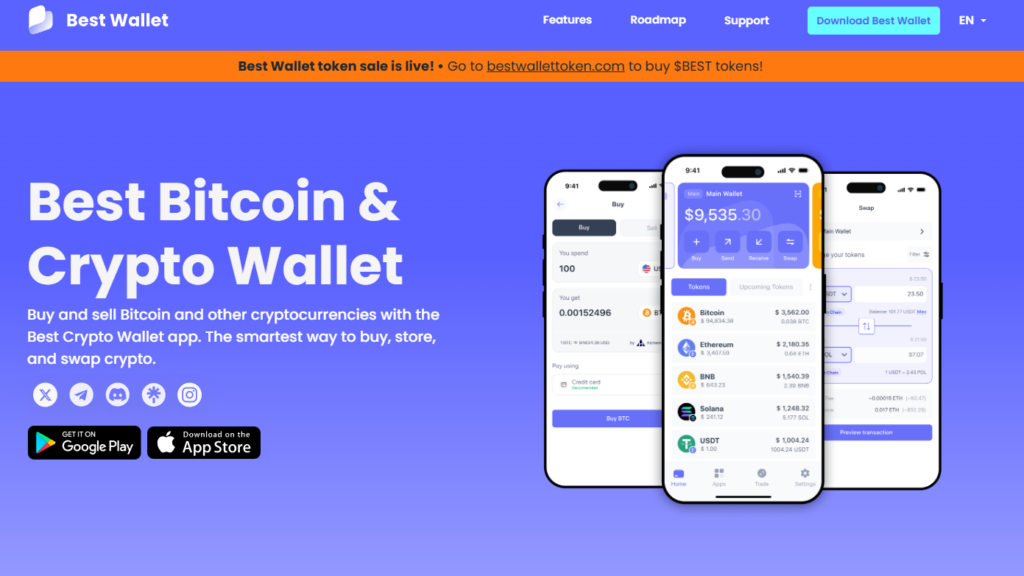
“Portfolio Management and Token Analytics give users everything they need to get in early on the hottest token launches, make the right trades at the right times, and maximise profits.” – Best Wallet Website
But this wallet isn’t all brawn and no brains. It’s also got that polished user interface that makes you feel like a tech wizard. Stacking sats, staking Ethereum, or dabbling in that shitcoin your friend shilled you on? This wallet handles it all like a pro. And let’s not forget the cherry on top: customizable transaction fees. Because who doesn’t love controlling their own gas destiny?
Best Wallet Features
- Unparalleled Security: Military-grade encryption, private key storage, and biometric authentication for ironclad protection.
- Seamless Integration: Supports a wide range of cryptocurrencies, from the classics like Bitcoin to emerging assets on the Binance Smart Chain.
- Customizable Fees: Adjust gas fees to suit your transaction needs.
- User-Friendly Design: A sleek, intuitive interface that even your grandma could navigate.
- Offline Storage: A hybrid option for cold storage without sacrificing mobility.
Best Wallet Advantages and Disadvantages
| Advantages | Disadvantages |
|---|---|
| Unmatched security measures | Premium features can be pricey |
| Supports different blockchains | Lacks direct integration with some DApps |
| Excellent customer support | Slightly higher learning curve for beginners |
| In-app staking opportunities | Limited NFT wallet capabilities |
Exodus: Supports Trezor Integration and In-Wallet Trading
Ah, Exodus. If Exodus Wallet were a person, it’d be that friend who always has a solution for everything—tech-savvy, stylish, and always one step ahead. It’s not just one of the best mobile wallets; it’s a whole crypto command center in your pocket, ready to tackle anything from managing digital assets to trading tokens like a pro.
With a user interface so smooth you’d think it was designed by a luxury carmaker, it’s built for anyone who wants crypto tools without the steep learning curve. And let’s not forget its Trezor integration, which brings the security of a hardware wallet into the mix. That’s right—Exodus lets you have your cake and eat it too: the convenience of a hot wallet with the ironclad safety of cold storage.
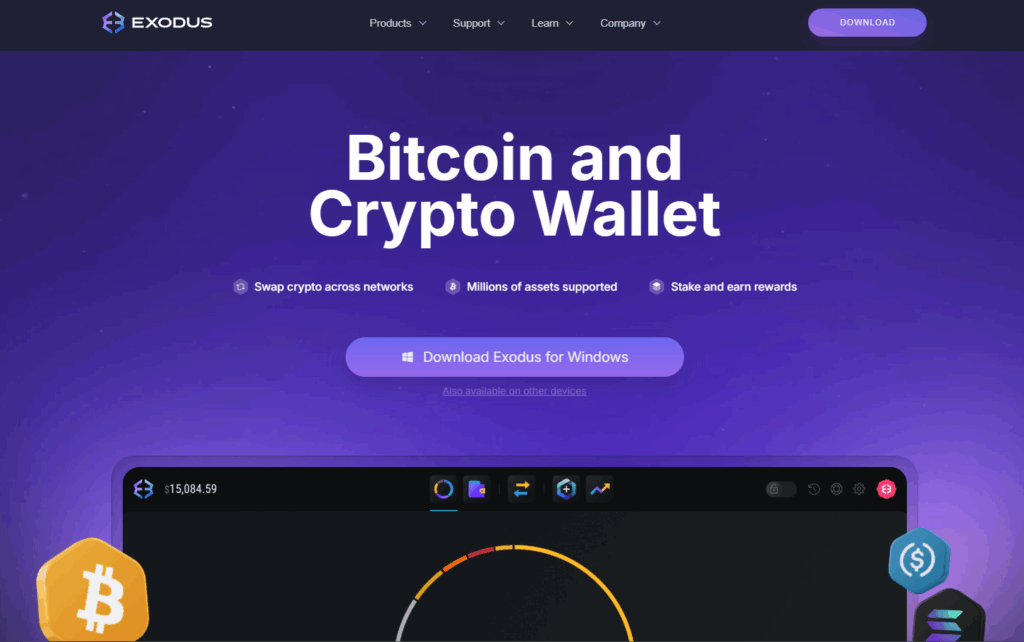
Here’s some exciting news: you can trade tokens directly in the wallet. There’s no need for complex crypto exchanges or lengthy email confirmations. Just tap, trade, and you’re good to go. It’s an easy process that makes you wonder why you didn’t begin doing it earlier.
Exodus Features
- Trezor Integration: Got a hardware wallet like Trezor? Perfect. Exodus syncs with it effortlessly, giving you the best of both worlds—cold storage security and mobile access.
- In-Wallet Trading: Forget hopping between platforms. Trade directly within the wallet, like a boss.
- Intuitive Bridging: Need to swap unique pairs like Polkadot for USDC on base? Exodus has your back!
- Wide Asset Support: Bitcoin, Ethereum, to esoteric pairs, Exodus has it covered.
- Polished UI: Let’s face it—user interface matters. Exodus is as easy on the eyes as it is to use.
- Cross-Platform Sync: Switch from mobile device to desktop or browser extension without missing a beat.
Exodus Advantages and Disadvantages
| Advantages | Disadvantages |
|---|---|
| Supports a wide range of crypto assets | Higher transaction fees than competitors |
| Stunning, intuitive user interface | Limited staking options |
| Built-in crypto exchange | Not fully open-source |
| Trezor integration for extra security | Might not support some newly launched meme coins |
Check out our comprehensive Exodus Wallet Review to know more about the benefits of using this wallet.
Zengo: Keyless Mobile Wallet with Best User-Interface
Let’s get real: most crypto wallets want you to be part coder, part security expert, and part psychic (because losing a seed phrase is basically a death sentence for your assets). Enter Zengo, the wallet that said, “Enough of that!” and rewrote the rules. As one of the best mobile wallets on the market, Zengo ditches the anxiety-inducing private key system and opts for something smarter, sleeker, and—dare I say—revolutionary.
Zengo runs on MPC (Multi-Party Computation) technology, which splits and encrypts your data into fragments, stored in separate locations. This means no one—not even Zengo—can access your wallet without your biometric authentication. No passwords to forget, no keys to lose, and no hackers waltzing into your wallet like it’s an open bar.
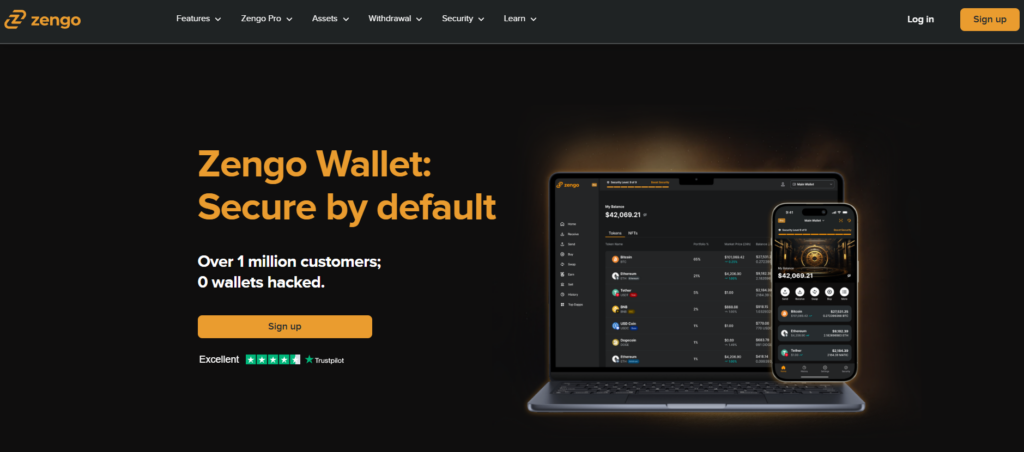
But security isn’t the only thing Zengo does right. This wallet is ridiculously user-friendly. From the moment you download the app, it feels less like a crypto tool and more like the perfectly designed mobile app you wish every wallet could be. Whether you’re a beginner dipping your toes into Bitcoin or an advanced trader managing a diverse portfolio, Zengo is the wallet that says, “Relax, I’ve got this.”
Zengo Features
- Keyless Security: No seed phrases, no drama. Zengo uses MPC cryptography and biometric authentication to ensure your wallet is safer than your Netflix password.
- Multi-Currency Support: Manage Bitcoin, Bitcoin Cash, Ethereum, and dozens of other assets, including support for NFTs and Web3 apps.
- Effortless Token Trading: Buy and sell crypto or connect to DeFi platforms with ease—no exchange accounts or browser extensions required.
- Built-In Web3 Firewall: Stay protected while exploring the crypto space, thanks to Zengo’s pioneering safeguards against phishing and scams.
- 24/7 Live Support: Forget the endless FAQ rabbit holes—Zengo’s real humans are ready to help you anytime, day or night.
- Automatic Backups: Your encrypted wallet is backed up in real-time, ensuring you’re covered no matter what.
Zengo Advantages and Disadvantages
| Advantages | Disadvantages |
|---|---|
| Keyless Security: Eliminates the need for traditional seed phrases, using cutting-edge MPC cryptography for secure, stress-free access. | No support for cold storage or direct integration with hardware wallets. |
| Biometric Authentication: Your face or fingerprint is your gateway—simple and highly secure. | Limited options for customizing transaction fees, which may not suit advanced traders. |
| Web3 Firewall: Offers unparalleled protection against scams and phishing when exploring the crypto space. | Focuses heavily on simplicity, which might not appeal to advanced users who want granular control. |
| Multi-Currency Support: Compatible with Bitcoin, Ethereum, NFTs, and a growing list of assets. | Smaller token selection compared to some competitors like Trust Wallet. |
| 24/7 Live Support: Real-time customer service ensures quick resolution of any issues. | Requires constant internet connection for cloud-based features, making it less ideal for offline access. |
| User-Friendly Interface: Designed for everyone, from beginners to seasoned crypto enthusiasts. | Some features, like DeFi connectivity, may feel basic for power users. |
Margex Wallet: The Best Mobile Wallet for Trading and Staking
If you’re looking for the best of both worlds—crypto exchange versatility with secure wallet-like functionality—Margex is the name you need to know. While not a traditional mobile wallet, Margex delivers a robust platform where you can store, trade, and stake your crypto assets with ease. For those who want to maximize their investments through high APY staking and seamless trading, Margex stands tall among platforms that blur the line between exchange and wallet.
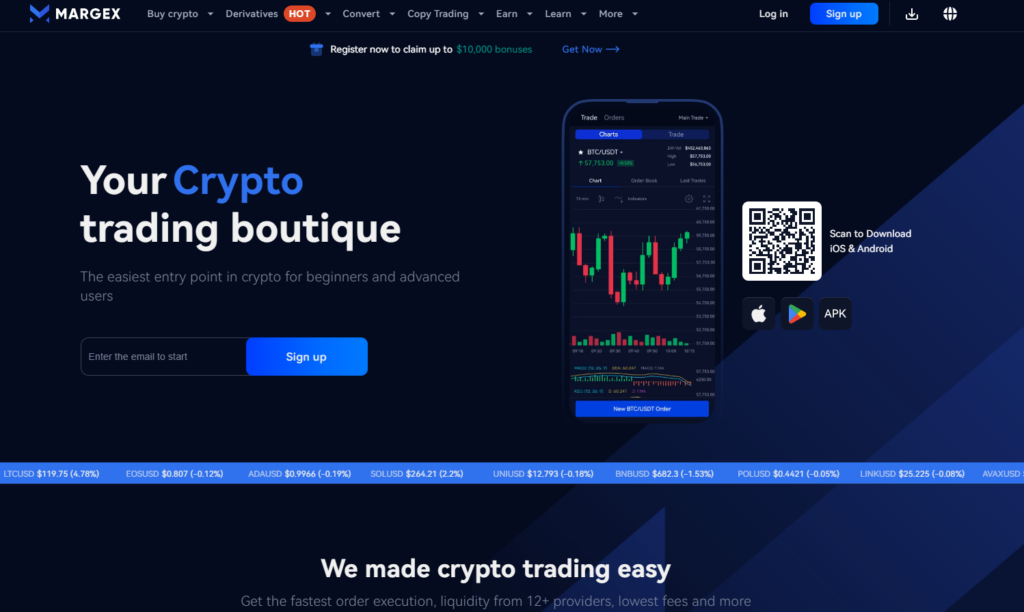
Margex doesn’t stop at just holding your digital assets. Its trading interface is built to empower everyone—from advanced traders executing precise strategies to casual investors looking to dip their toes into staking. With multi-signature cold storage, a no-manipulation trading system, and 24/7 accessibility, Margex is about convenience.
Margex Wallet Features
- Multi-Wallet Functionality: Securely store your crypto assets within the exchange’s wallet system, featuring cold storage and multi-signature authorization.
- High-Yield Staking: Enjoy staking opportunities with market-leading APYs to grow your holdings passively.
- Anti-Manipulation Pricing: Margex’s proprietary system ensures a level playing field for traders by preventing artificial price spikes or manipulation.
- User-Friendly Trading Interface: From advanced order types to real-time market data, Margex provides all the tools for seamless trading.
- Enhanced Security: All user assets are stored in cold storage, ensuring maximum protection against online threats.
- Instant Liquidity: Fast deposits and withdrawals give you access to your funds when you need them.
Margex Wallet Advantages and Disadvantages
| Advantages | Disadvantages |
|---|---|
| Industry-leading staking rewards | Not a standalone mobile wallet, but rather an exchange with wallet-like features. |
| Anti-manipulation system ensures fair pricing | Limited to assets supported on the exchange. |
| All assets stored in cold storage for maximum security | Lacks NFT and Web3 functionality for broader blockchain interaction. |
| Offers instant liquidity and seamless trading | Doesn’t support hardware wallet integration like Exodus or Zengo. |
| Perfect for advanced users and active traders | Beginners might find the trading tools overwhelming. |
OKX Wallet: Top-Rated Bitcoin Mobile Wallet in 2026
If you’ve been around the crypto block, you know the trade-off: convenience versus control. Custodial wallets might seem easy, but they come with baggage—your private keys aren’t really yours, and a centralized service can freeze your funds faster than you can say, “not your keys, not your crypto.” Enter OKX Wallet, a true decentralized gem among the best mobile wallets, built for people who want to own their crypto journey outright.

OKX Wallet combines multi-chain support, Web3 integration, and a slick design to make navigating the crypto space feel less like work and more like play. Manage assets across Ethereum, Solana, Binance Smart Chain, and more—all while keeping total control of your private keys. Want to swap tokens, stake your assets, or dive headfirst into DeFi platforms? You’re a few taps away.
OKX Wallet also integrates seamlessly with the broader OKX ecosystem, giving you direct access to the crypto exchange, staking opportunities, and dApps from a single, intuitive interface. Add in its focus on biometric authentication and seed phrase management, and you’ve got one of the most secure, user-friendly wallets in the game.
OKX Wallet Features
- Multi-Chain Mastery: Manage crypto across major blockchains like Ethereum, Solana, Binance Smart Chain, and Polygon without breaking a sweat.
- Web3 Native: From staking tokens on DeFi protocols to minting your next NFT masterpiece, OKX Wallet is your passport to the decentralized world.
- Total Control: No middlemen, no custodial nonsense—your keys, your funds, your rules.
- Biometric Security: Protect your wallet with fingerprint or facial recognition, ensuring only you can access your assets.
- Cross-Platform Syncing: Start on your phone, finish on your desktop, or check in via the browser extension—it’s all connected.
- Gas Fee Flexibility: Fine-tune transaction costs to prioritize speed or savings.
OKX Wallet Advantages and Disadvantages
| Advantages | Disadvantages |
|---|---|
| Multi-Chain Support: Seamlessly manage assets across Ethereum, Solana, Binance Smart Chain, and more. | Can be overwhelming for beginners due to advanced features. |
| Non-Custodial Design: Complete control of your private keys—no middlemen involved. | Limited support for direct integration with hardware wallets like Ledger or Trezor. |
| Web3 Integration: Interact with DeFi platforms, DApps, and NFT marketplaces directly from the wallet. | Requires a stable internet connection for most features—no offline mode for access. |
| Cross-Platform Syncing: Sync across mobile, desktop, and browser extensions seamlessly. | Not as beginner-friendly as wallets like Zengo. |
| Biometric Authentication: Advanced security ensures only you can access your assets. | Staking and DeFi options are limited compared to dedicated platforms. |
| Gas Fee Customization: Optimize transaction fees for cost or speed based on your needs. | Focuses heavily on Web3 tools, which might not appeal to users seeking a simple storage solution. |
What Is A Crypto Mobile Wallet?
A crypto mobile wallet is like your phone’s sleek answer to a bank account for cryptocurrency users. It’s a digital wallet you can download from an app store, designed to store, send, and receive your Bitcoin, Ethereum, and other tokens with ease. Think of it as a safe place for your crypto assets, but one that fits right in your pocket and keeps you connected to the cryptocurrency exchange ecosystem on the go.
But it doesn’t stop at being a simple software wallet. A crypto mobile wallet can double as your access point to Web3, letting you trade on decentralized platforms, interact with smart contracts, and even manage NFTs. If you’re looking for a Bitcoin wallet or the best crypto wallet to manage multiple assets, a mobile wallet is the all-in-one solution.
Types of Mobile Wallets
Not all mobile wallets are created equal. Some prioritize convenience, while others focus on giving you full control of your crypto assets. Broadly, mobile wallets fall into two categories: custodial and non-custodial wallets. Your choice depends on your level of comfort with managing private keys and your need for security versus accessibility.
Custodial Mobile Wallets
A custodial wallet is like checking your funds into a hotel—you’re the guest, but the staff (in this case, the wallet provider) holds the keys. Wallets like Coinbase Wallet fall into this category. They’re user-friendly, making them great for beginners who want a plug-and-play experience. These wallets are often integrated with centralized exchanges, giving you access to trading, swapping, and even earning rewards with minimal effort.
Benefits of Custodial Wallets:
- No need to manage private keys or recovery phrases—the provider handles it for you.
- Easy integration with crypto exchanges for seamless trading and transactions.
- Reliable customer support if you run into trouble.
Drawbacks of Custodial Wallets:
- You don’t fully control your crypto—your assets are essentially held in trust by a third party.
- More vulnerable to hacks since private keys are stored on centralized servers.
- Limited privacy, as your activity is often tied to your email address or account.
Non-Custodial Mobile Wallets
A non-custodial wallet flips the script: you’re the only one holding the keys to your crypto. Wallets like Zengo Wallet and Exodus Wallet are examples of this type. These wallets put the power in your hands, making them ideal for experienced crypto investors who value independence and security.
Benefits of Non-Custodial Wallets:
- Full ownership of your private keys and assets—no middlemen.
- Enhanced privacy, as transactions don’t require linking to a centralized exchange.
- Compatible with hardware wallets like the Ledger Flex for added security.
Drawbacks of Non-Custodial Wallets:
- Losing your recovery phrase means losing access to your funds permanently.
- Less beginner-friendly, requiring a basic understanding of best practices for crypto security.
Pros and Cons of Using Mobile Wallets
| Pros | Cons |
|---|---|
| Convenient for accessing crypto anytime, anywhere. | Internet connection required—no offline access. |
| Support for multiple assets, including NFTs and Web3 tools. | More vulnerable to hacks compared to hardware wallets. |
| Compatible with both custodial and non-custodial systems. | Requires careful management of private keys or reliance on third parties. |
| Ideal for trading, staking, and DeFi interaction. | Mobile devices are susceptible to malware or loss. |
Key Features to Look For in a Mobile Crypto Wallet
When choosing the best mobile wallet, focus on these key features to ensure your crypto stays secure and accessible:
- Security Features: A wallet with biometric authentication and strong encryption keeps your assets safe from hackers and prying eyes.
- Supported Cryptocurrencies and Tokens: Look for broad compatibility across blockchains, so you can manage everything from Bitcoin to NFTs in one place.
- User Experience (UX) and Interface: A clean, intuitive design is essential—nobody wants to fumble through menus when transferring funds.
- Reputation and Reviews: Check for wallets with positive feedback from other crypto users, as well as a history of reliability.
- Transaction Fees: Choose a wallet that allows you to customize gas fees, balancing cost and speed to suit your needs.
- Staking and Earning Opportunities: Many wallets offer integrated staking, letting your assets grow passively while staying accessible.
- Backup and Recovery Features: A robust recovery phrase system ensures you won’t lose access to your funds, even if you lose your phone.
How to Use Crypto Mobile Wallet: Step-by-Step Guide
Setting up your crypto mobile wallet should feel as smooth as slipping on your favorite pair of sneakers—comfortable and reliable. Follow these steps to set up Best Wallet, one of the best mobile wallets in the game, and take control of your digital assets with confidence.
Step 1: Download and Install Best Wallet
Start by heading to your phone’s app store. Search for Best Wallet and double-check that it’s the official app—look for high ratings and reviews to avoid imitations from third parties. Hit “Install,” and within minutes, you’ll be ready to roll.’
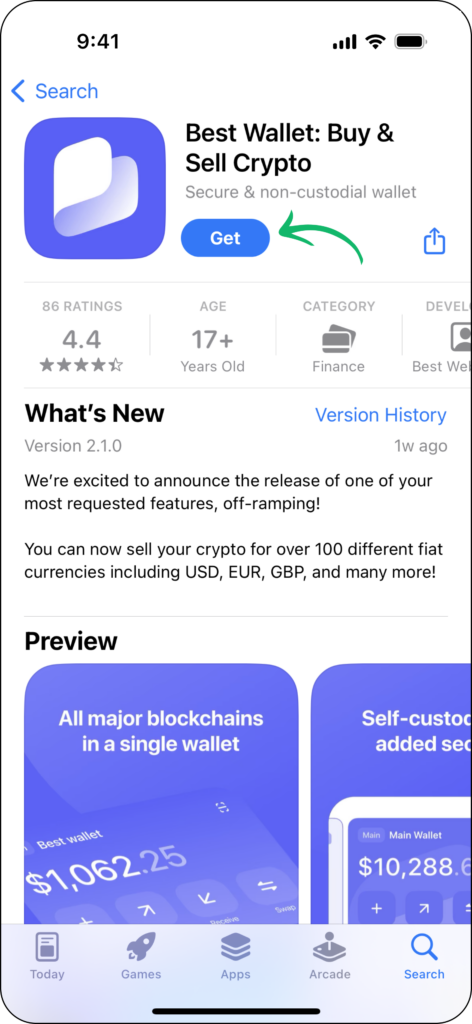
Pro Tip: Always ensure you’re downloading apps from trusted sources like the Google Play Store or Apple App Store to minimize security risks.
Step 2: Create a New Wallet
Open the app and select “Create New Wallet.” The app will prompt you to set up your account with either your email address or your preferred login credentials. This process is quick, ensuring your wallet is tied securely to you.
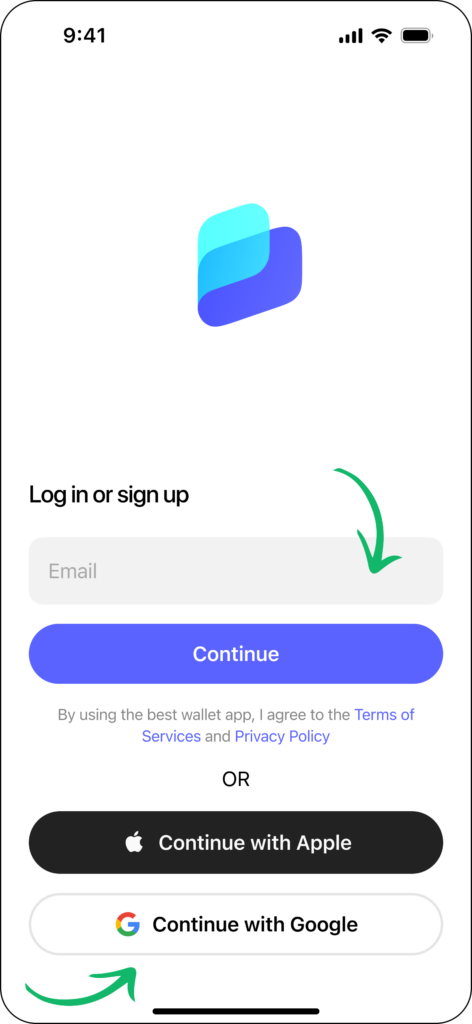
Step 3: Write Down Your Recovery Phrase
Here’s where things get serious. Best Wallet generates a unique recovery phrase, a series of 12-24 random words. This is the ONLY failsafe if you lose access to your phone or the app.
- Write your recovery phrase down on paper and store it in a safe place.
- Never screenshot or save it online—doing so could expose it to hackers.
Pro Tip: Consider using a fireproof, waterproof storage case or pairing this with a Ledger Flex for offline backups.
Step 4: Enable Security Features
Best Wallet lets you go the extra mile when it comes to security. Enable biometric authentication (fingerprint or facial recognition) for quick yet secure access. You can also set up a PIN for added protection.
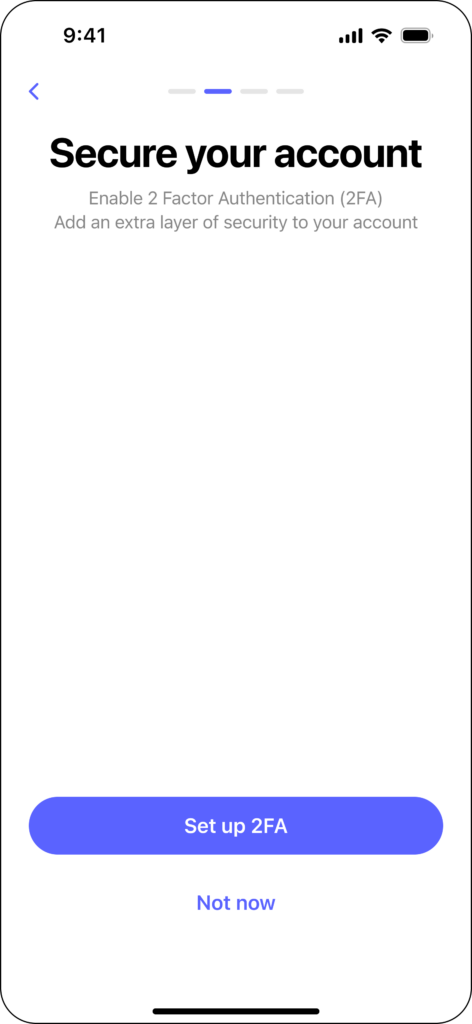
Step 5: Add Crypto to Your Wallet
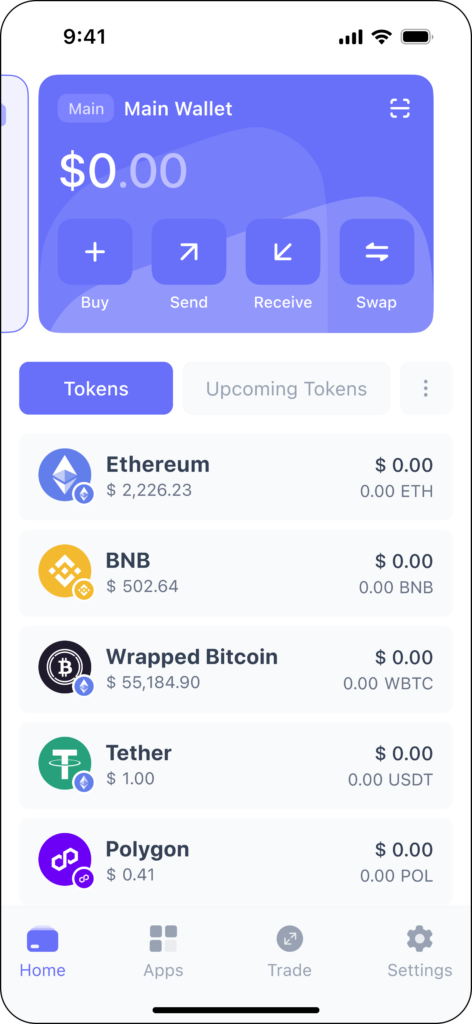
Your wallet is ready to use—time to fund it. You can add crypto in two ways:
- Receive Funds: Copy your wallet’s public key (or scan the QR code) and share it with the sender.
- Buy Crypto: Use Best Wallet’s built-in purchasing feature to buy directly with a credit card or bank account. This saves you the hassle of visiting a cryptocurrency exchange.
Future Trends in Mobile Crypto Wallets
The crypto wallet market isn’t just heating up—it’s on fire. According to SkyQuest Technology, the global market for crypto wallets is projected to hit a jaw-dropping $48.27 billion by 2032, growing at a blistering 24.8% CAGR from 2025 to 2032. If you thought mobile wallets were just about storing your Bitcoin, think again. These sleek little apps are evolving into the Swiss Army knives of the crypto space, packed with features that even a few years ago felt like science fiction.
Let’s break down the trends shaping the future of mobile crypto wallets—and why they’re becoming indispensable for crypto investors everywhere.
Trend 1: The Rise of Non-Custodial Wallets
2023 taught us one thing: “not your keys, not your crypto” isn’t just a mantra—it’s survival advice. With centralized exchanges making headlines for all the wrong reasons (think bankruptcies, hacks, and frozen accounts), users are ditching custodial wallets in favor of non-custodial options. Why? Control. Wallets like Zengo and Exodus put you in the driver’s seat, giving you ownership of your private keys and keeping third parties out of your business. People are tired of trusting centralized platforms that turn out to be little more than leaky boats. In the future, expect non-custodial mobile wallets to become the gold standard for anyone who values autonomy and additional security.
Trend 2: Web3 is Taking Over
Let’s get one thing straight: mobile wallets aren’t just wallets anymore. They’re evolving into Web3 command centers. Need to stake your Ethereum? Done. Want to mint an NFT? Easy. Shopping for the next big DeFi project? Your wallet has you covered.
The next generation of wallets, led by players like OKX Wallet, is about interaction. These wallets will integrate seamlessly with DApps, NFT marketplaces, and DeFi platforms, turning your phone into a portal for everything crypto has to offer. Forget bouncing between tabs or logging into crypto exchanges—your wallet will handle it all.
Trend 3: Enhanced Security Features
Security is no longer just a nice-to-have; it’s the price of admission. As the market grows, so do the threats. Expect wallets to double down on innovations like biometric authentication, multi-signature verification, and even Web3 firewalls to protect against scams and phishing attacks. Wallets like Zengo are already setting the bar with MPC cryptography (no more recovery phrases!), but the race for the most secure wallet is just getting started.
Trend 4: Multi-Chain Support Will Be a Must
Gone are the days when owning Bitcoin and Ethereum was enough. Crypto users are exploring blockchains like Solana, Avalanche, and Binance Smart Chain, and they expect their wallets to keep up. The best mobile wallets of the future won’t just store assets—they’ll support different blockchains seamlessly, letting you manage all your holdings in one place.
Trend 5: Staking and Passive Income Will Go Mainstream
Earning while you hodl? Yes, please. Staking has gone from niche to mainstream, and mobile wallets are making it easier than ever. Wallets like Margex Wallet already let users stake tokens for high APYs, and this trend is only going to expand. Expect more wallets to integrate staking rewards, lending, and even auto-compounding features to help your assets grow while you sleep.
Best Hardware Alternative to Mobile Wallets
While mobile wallets are undeniably convenient, some users need an extra layer of security that only hardware wallets can provide. A hardware wallet is the gold standard for crypto storage, offering offline protection against hacks, phishing, and malware. Unlike mobile wallets, which are connected to the internet, hardware wallets keep your private keys offline, making them virtually immune to online attacks.
For those managing significant amounts of crypto or simply looking for a safe place to store their assets long-term, hardware wallets are worth considering. Here, we’ll explore two of the most trusted names in the space: Ledger and Trezor.
Ledger
When it comes to hardware wallets, Ledger is often the first name that comes to mind—and for good reason. With a reputation for being one of the most secure wallets on the market, Ledger’s popular products, such as the Ledger Flex, offer a blend of robust features and user-friendly design. It’s a favorite among crypto investors who want the best of both worlds: top-notch security and easy accessibility.
Key Features of Ledger Flex
- Offline Storage: Keeps your private keys entirely offline, minimizing the risk of cyberattacks.
- Multi-Asset Support: Manage over 5,500 cryptocurrencies, including Bitcoin, Ethereum, and NFTs.
- Bluetooth Connectivity: Connect to your phone wirelessly using the Ledger Live app for seamless management.
- Staking Opportunities: Earn passive income by staking assets directly through the Ledger interface.
- Backup and Recovery: Comes with a recovery phrase system to restore your funds if the device is lost or damaged.
- Compact and Durable Design: Sleek, portable, and built to last.
- Touchscreen display: Flex comes with a 2.84-inch grayscale touchscreen display for easy transaction signing.
Why Choose Ledger? Ledger Flex is perfect for advanced users and crypto investors who prioritize security without sacrificing convenience. With its Bluetooth integration, you can enjoy the ease of a mobile wallet with the unparalleled protection of a hardware wallet.
Pro Tip: Check out our comprehensive Ledger Flex review for more details.
Trezor
If Ledger is the king, Trezor is the founding father of hardware wallets. Known for its pioneering approach to crypto security, Trezor has been a go-to choice for crypto enthusiasts since 2014. The Trezor Suite software pairs seamlessly with its devices, making it easy to manage your assets while keeping them secure.
Key Features of Trezor
- Secure Key Management: Your private keys are stored offline, completely insulated from potential online threats.
- Wide Compatibility: Supports a range of assets, including Bitcoin, Ethereum, and tokens on the Binance Smart Chain.
- User-Friendly Interface: The Trezor Suite desktop and browser software offer an intuitive way to interact with your wallet.
- Passphrase Protection: An additional layer of security beyond the standard recovery phrase.
- Open-Source Technology: Trezor’s firmware is open source, ensuring transparency and constant improvements from the crypto community.
Why Choose Trezor? Trezor is ideal for users who value simplicity and transparency. With its passphrase protection and open-source firmware, it’s a great choice for those who want maximum control over their crypto.
Pro Tip: Check out our comprehensive Trezor Safe 5 review for a deep dive.
Conclusion: Top Crypto Mobile Wallets
Alright, let’s bring it home. If you’ve made it this far, congrats—you’re now equipped with more wallet wisdom than most of the crypto Twitterverse. Choosing the best mobile wallet isn’t just about convenience; it’s about having a digital sidekick that protects your assets, makes your life easier, and occasionally lets you flex on your friends with its features.
The point is, there’s no one-size-fits-all when it comes to wallets. Your choice depends on who you are in the crypto world: Are you a DeFi degen chasing the next APY? A cautious hodler treating Bitcoin like digital gold? Or maybe you’re the kind of person who wants a little of everything—staking here, NFTs there, a sprinkle of passive income everywhere.
Here’s the kicker: the right wallet doesn’t just store your assets; it empowers you to use them, grow them, and protect them like the treasure they are. So go on, download that wallet, secure your private keys, and take control of your financial future. Because if crypto is rewriting the rules of money, then your wallet is the pen.
And hey, don’t forget: in this wild, decentralized world, the only thing scarier than losing your recovery phrase is trusting someone else to hold it for you. Stay smart, stay secure, and most importantly, stay in control.
Now, go conquer the crypto space—your wallet’s waiting.
See Also:
- Best NFT Wallets in 2026 for Safe and Easy Storage
- Top Web3 Wallets You Can Trust in 2026
- Crypto Wallet Security: How to Store Crypto Safely
- 7 High-Risk High-Reward Cryptos for 2026
- 14 Best Crypto Staking Coins to Invest in 2026
FAQs
What is a mobile wallet?


A mobile wallet is a digital wallet app that allows you to store, send, receive, and manage cryptocurrencies directly from your smartphone.
Are mobile wallets safe?
Yes, mobile wallets are safe when used correctly, especially those with features like biometric authentication, private key management, and recovery phrases. However, always download wallets from official sources and avoid sharing your keys.
Do mobile wallets charge fees?
Mobile wallets themselves don’t typically charge fees, but you may incur network transaction fees (e.g., gas fees) and additional costs for features like in-app token purchases.
Can mobile wallets be hacked?
While non-custodial wallets are safer because you hold your private keys, mobile wallets connected to the internet are still vulnerable to phishing, malware, and other attacks if security best practices aren’t followed.
Can I use a mobile crypto wallet for NFT storage?
Yes, many mobile wallets support NFT storage, allowing you to store and view your NFTs alongside your cryptocurrencies. Look for wallets with Web3 integration for seamless management.
What is the best mobile wallet for beginners?
Wallets like Best Wallet and Exodus are ideal for beginners, offering user-friendly interfaces, easy setup, and built-in security features.
References
- OKX Web3. “Rewrite the System.” OKX, https://www.okx.com/en-us/web3/rewritethesystem
- Margex Help Center. “Help Center.” Margex, https://help.margex.com/help-center
- Zengo. “Security.” Zengo Wallet, https://zengo.com/security/
- Exodus Support. “Support.” Exodus Wallet, https://www.exodus.com/support

Why you can trust 99Bitcoins
Established in 2013, 99Bitcoin’s team members have been crypto experts since Bitcoin’s Early days.
Weekly Research
100k+Monthly readers
Expert contributors
2000+Crypto Projects Reviewed