In This Article
- KeepKey Wallet Review Summary
- What Is a Hardware Wallet?
- KeepKey Company Overview
- KeepKey Design and Build Quality
- Security Model
- Supported Cryptocurrencies
- Software and Ecosystem Integration
- How to Set Up KeepKey
- KeepKey Pricing and Value
- KeepKey vs. Modern Hardware Wallets
- Software Wallet vs. Hardware Wallet
- Conclusion
This KeepKey hardware wallet review takes an up-to-date look at one of the longest-standing cold storage devices in the crypto space. KeepKey has been around for nearly a decade and is often mentioned alongside early hardware wallet pioneers such as Trezor and Ledger.
While the hardware wallet market has evolved in recent years, with new entrants offering advanced features like Bluetooth, mobile-first designs, and expanded token support, KeepKey remains relevant as a minimalist, security-focused option aimed at long-term holders who value simplicity over cutting-edge functionality.
This review examines KeepKey wallet’s design, security model, supported assets, software ecosystem, pricing, and how it compares to modern competitors in 2026.
KeepKey Wallet Review Summary
KeepKey is a non-custodial hardware wallet designed to store private keys offline and protect cryptocurrency holdings from online threats. It is known for its large screen, simple interface, and tight integration with the ShapeShift ecosystem.
However, compared to its main competition, such as TREZOR One and Ledger Nano X, KeepKey offers more limited asset support, no wireless connectivity, and fewer mobile features. As a result, it is best suited for users who prefer a straightforward, desktop-based cold storage solution rather than an all-in-one Web3 wallet.
What Is a Hardware Wallet?
A hardware wallet is a physical device that stores a user’s private keys offline, isolating them from internet-connected environments. Instead of exposing private keys to potentially compromised computers or mobile phones, hardware wallets sign transactions internally and require on-device confirmation before execution.
This design significantly reduces the risk of remote attacks, phishing, and malware-based key extraction. Even if a connected computer is infected, a properly used hardware wallet prevents private keys from leaving the device.
If you are after a more detailed review of different types of wallets, here’s our complete video tutorial:
KeepKey Company Overview
KeepKey was founded in 2015 and initially gained traction as a sleek, design-focused alternative to early hardware wallets. In 2017, the company was acquired by ShapeShift, a cryptocurrency exchange that later transitioned into a decentralized, DAO-driven platform.
Today, KeepKey development and support continue under the broader ShapeShift ecosystem. While it is no longer positioned as a rapidly evolving flagship product, it remains actively maintained and supported.
KeepKey Design and Build Quality
One of KeepKey’s standout features is its physical design. The device is larger than most competing hardware wallets and features a bright, high-resolution display that makes transaction verification easy and readable.
The metal-backed casing gives the device a solid, premium feel, and the large screen reduces the risk of misreading addresses or transaction details. However, the size also makes it less portable than smaller USB-style hardware wallets.
KeepKey wallet connects via USB and does not support Bluetooth or NFC, reinforcing its desktop-oriented use case.
Security Model
KeepKey follows a standard hardware wallet security architecture:
- Private keys are generated and stored entirely offline
- Transactions must be physically confirmed on the device
- PIN protection prevents unauthorized physical access
- Optional passphrase support adds an extra layer of security
Transaction details are displayed directly on the device screen, allowing users to verify addresses and amounts before signing.
Like all hardware wallets, security depends heavily on correct usage. Users must safely store their recovery phrase offline and keep firmware up to date to benefit from the latest security improvements.
Supported Cryptocurrencies
KeepKey supports a broad but selective range of cryptocurrencies and tokens. Core assets include:
In addition to native coins, KeepKey supports selected ERC-20 tokens through compatible software interfaces. However, its overall asset coverage is narrower than that of leading competitors, particularly for newer blockchains and niche ecosystems.
For users with diverse, multi-chain portfolios, this limitation may be a deciding factor.
Software and Ecosystem Integration
KeepKey integrates closely with the ShapeShift platform, allowing users to:
- View balances and manage assets
- Swap supported cryptocurrencies without using a centralized exchange
- Sign transactions securely on-device
The wallet can also be used with third-party software such as Electrum for Bitcoin management.
Unlike newer hardware wallets, KeepKey does not offer native mobile apps or direct Bluetooth connectivity. All interactions occur through desktop-based interfaces.
How to Set Up KeepKey
Setting up your KeyKey for the first time is similar to setting up any other hardware wallet. You’ll need to download the KeepKey client from the Chrome web store, connect your device, and follow the instructions you see on the screen.
The process typically takes only a few minutes. The large screen and simple navigation make setup especially approachable for beginners.
Once configured, daily use is intuitive, though users accustomed to mobile-first crypto tools may find the experience more limited.
KeepKey Pricing and Value
KeepKey is positioned as a budget-friendly hardware wallet. Its pricing is generally lower than flagship devices from Ledger and Trezor, making it appealing to users who want offline storage without paying a premium.
While affordable, the lower price reflects its narrower feature set rather than reduced security.
KeepKey vs. Modern Hardware Wallets
Compared to newer hardware wallets released in recent years, KeepKey emphasizes stability and simplicity over innovation.
Pros:
- Large, readable display
- Straightforward security model
- Competitive price point
Cons:
- No Bluetooth or mobile support
- Smaller list of supported assets
- Slower feature expansion
Users who actively engage with decentralized finance (DeFi), NFTs, or multi-chain ecosystems may prefer newer devices. Long-term holders focused on core assets may find KeepKey sufficient.
Software Wallet vs. Hardware Wallet
KeepKey is best suited for:
- Long-term crypto holders
- Users focused on major cryptocurrencies
- Desktop-first users who value simplicity
- Those seeking an affordable hardware wallet
It is less ideal for users who need mobile access, extensive token support, or deep Web3 integrations.
Looking for a different kind of wallet? A software wallet might be just the thing, especially if you’re after a quick, versatile, and accessible option. Our top pick for a hot wallet is Best Wallet—a standout choice in the software category that’s earned the trust of crypto investors for several key reasons.
Best Wallet comes highly recommended as an anonymous crypto wallet. The brand also offers real-time market insights, making it easier to keep track of price trends and manage your portfolio effectively. Supporting multiple popular blockchains like Ethereum and Binance Smart Chain, it ensures you have access to a wide array of tokens without jumping through hoops.
Aside from its usage as a software wallet, with Best Wallet, you also get a decentralized exchange. This feature means you can trade while keeping your identity secure, all while having full control over your private keys. The user interface is clean and intuitive, so it’s ideal for both beginners exploring crypto for the first time and seasoned investors looking for a simple, effective wallet experience.
Visit Best WalletConclusion
KeepKey remains a solid, no-frills hardware wallet in 2026. While it no longer leads the market in features or asset coverage, it continues to deliver reliable cold storage, clear transaction verification, and a straightforward user experience.
For users who prioritize security and simplicity over constant innovation, KeepKey still holds a legitimate place in the hardware wallet landscape.
Keepkey
$79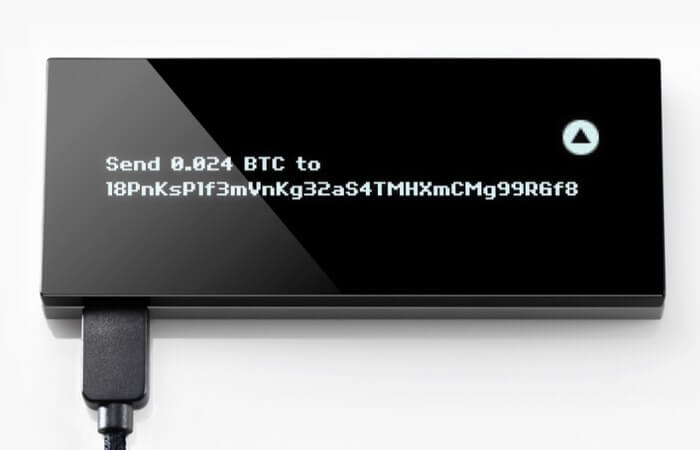
Pros
- Great design
- Intuitive to use
- Competitive price tag
Cons
- Not very portable
- Supports only 40 assets
See also: 10+ Best Hardware Wallets in January 2026
FAQs
Is KeepKey a safe hardware wallet?

Yes, KeepKey is considered a secure hardware wallet. It stores private keys offline, requires on-device transaction confirmation, and supports PIN and passphrase protection, which helps protect funds from online threats and malware.
What cryptocurrencies does KeepKey support?
KeepKey supports major cryptocurrencies such as Bitcoin, Ethereum, Litecoin, Bitcoin Cash, Dogecoin, and Dash, along with selected ERC-20 tokens. However, its overall asset support is more limited compared to newer hardware wallets.
Does KeepKey work with mobile devices?
No, KeepKey does not offer native mobile apps or Bluetooth connectivity. It is designed primarily for desktop use via USB connections and compatible software interfaces.
How does KeepKey compare to Ledger and Trezor?
KeepKey offers strong security and a lower price but supports fewer cryptocurrencies and lacks mobile features. Ledger and Trezor provide broader asset support, more frequent updates, and advanced connectivity options.
Can KeepKey be used with decentralized exchanges?
Yes, KeepKey integrates with the ShapeShift platform, allowing users to swap supported cryptocurrencies without transferring funds to a centralized exchange. Transactions are still signed securely on the device.
What happens if I lose my KeepKey device?
If your KeepKey device is lost or damaged, you can recover your funds using the recovery phrase created during setup. As long as this phrase is stored safely offline, your assets can be restored on another compatible wallet.

Why you can trust 99Bitcoins
Established in 2013, 99Bitcoin’s team members have been crypto experts since Bitcoin’s Early days.
Weekly Research
100k+Monthly readers
Expert contributors
2000+Crypto Projects Reviewed