
In This Article
Our Trezor Safe 7 review will take an in-depth look at the newest hardware wallet from Trezor. We’ll dive into the wallet’s security features, including what makes it different from existing hardware wallets, and help you decide if it’s the best wallet for your needs.
If you’re concerned about the safety of your crypto, a hardware wallet is an absolute must-have. Only hardware wallets are secure against the most common forms of attack, and they’re the only devices capable of keeping your valuable tokens truly safe.
But not all hardware wallets are created equally, and advances in quantum computing threaten to dramatically compromise the security of many existing wallets. The Trezor Safe 7 aims to get ahead of the quantum era while providing convenient, secure tools for crypto users today.
Keep reading to learn everything you need to know about the Trezor Safe 7 and find out if it’s the most secure wallet for your tokens in 2026.
Trezor Safe 7's Key Features
- Price: $249
- Dual-element TROPIC01 and EAL6+ secure element chips
- Post-quantum cryptography
- PIN and passphrase protection
- Fully open-source
- Bluetooth and USB-C connectivity
- 2.5” color touchscreen with Gorilla Glass protection
- IP67 dust and waterproof rating
- LiFePO4 battery with wireless charging
- Supports 9,000+ assets with Trezor Suite app
- Compatible with Windows, Mac, Linux, iOS, and Android devices
Trezor Safe 7 Review Summary
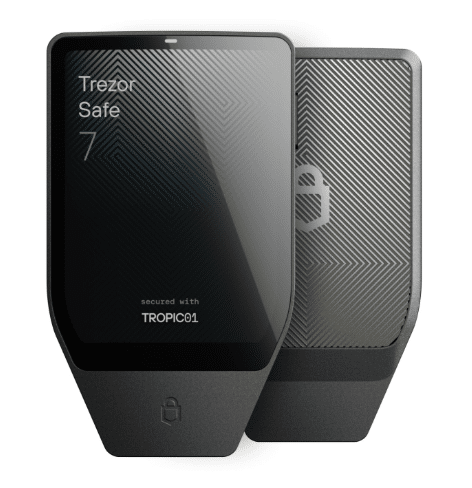
The Trezor Safe 7 is an impressive hardware wallet featuring a premium anodized aluminium unibody that builds on Trezor’s legacy of industry-leading security. It’s the first wallet to use post-quantum cryptography and the first wallet to use fully auditable secure element chips. It also improves on the Trezor Safe 5 with a larger touchscreen, Bluetooth connectivity, and a lithium-iron-phosphate (LiFePO4) battery that supports wireless charging.
Aside from the steep $249 price tag, we couldn’t find any flaws with the Trezor Safe 7. Trezor wallets already have a reputation for being essentially impossible to hack, and the Safe 7 is now ready to keep your tokens safe even in the quantum era. If you need a wallet you can trust to store large amounts of crypto, this is it.
Visit Trezor for Your DiscountWhat is The Trezor Safe 7? Initial Impressions
The Trezor Safe 7 is the newest hardware wallet from Trezor, the vaunted crypto wallet company owned by Satoshi Labs. It was announced in October 2025 at the Trustless by Design conference and began shipping in November 2025.

The Trezor Safe 7 marks a few firsts for both Trezor and the crypto world. Most significantly, Trezor advertises it as the world’s first post-quantum hardware wallet. It uses quantum-safe cryptography and Trezor says it can be updated as blockchains become quantum-secure to protect your tokens against future threats.
Another major change for the Trezor Safe 7 compared to existing Trezor hardware wallets is wireless capability. The Safe 7 is equipped with Bluetooth and supports wireless charging, making it more convenient to use without sacrificing security.
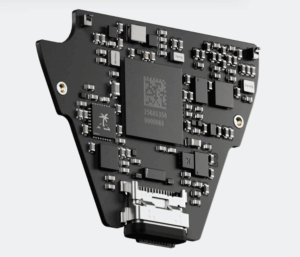
The wallet builds on Trezor’s history of extreme security with a dual-element chip design that includes both a TROPIC01 chip and an EAL6+ secure element chip. The chips are open-source and fully auditable. The wallet uses PIN and passphrase protection and offers 12-, 20-, and 24-word backup phrases for even more recovery options than the older Trezor Safe 5 wallet.
The Trezor Safe 7 features a larger device screen than the Safe 5 and earlier Trezor models, while keeping the color touchscreen, reinforced glass protection, and haptic feedback that we loved in that model. It also fully supports the Trezor Suite app across all major devices, along with 30+ third-party wallets and 70,000+ dApps, making it ideal for a wide range of crypto users.
Trezor’s wallets have consistently ranked on our Best Hardware Wallets and Best Bitcoin Wallets guides, and we’re happy to report that the Trezor Safe 7 will continue that trend. We’ve long been fans of Trezor here at 99Bitcoins, so we’re excited that the company’s newest model looks like a huge step forward rather than a stumble.
For most crypto owners, the point of using a hardware wallet is that it’s the safest way to store their tokens. For example, the Trezor Safe 7 puts the private keys in the user’s hands to offer self custody over all digital assets. So, we’re going to spend most of our Trezor Safe 7 review discussing whether this wallet is truly secure and reliable, and whether it’s worth the premium price point. (Note that we won’t dive into how hardware wallets work or why you need one in this review—check out our guide to Hardware Wallets Explained for more details on those topics.) Before we jump into the specific security focused features of the new wallet, it’s worth discussing Trezor as a company. Trezor is owned by Satoshi Labs, a Prague-based crypto firm established in 2013. Trezor’s first hardware wallet was the Trezor One, released all the way back in 2014. In recent years, the company has revamped this original design with the Trezor Safe 3 (released in 2023), Safe 5 (2024), and now the Safe 7. Over the past decade-plus, Trezor has sold millions of its wallet devices and none of them have ever been remotely hacked. That’s an astounding accomplishment given how many hackers, security researchers, and cybercriminals have likely targeted these wallets over the years. It was only recently that hackers found a way to physically break into older Trezor models, known as “voltage-glitching.” However, the company has adapted its newer devices, starting with the Safe 3, to prevent this unlikely attack, and the Safe 7 is fully resistant to voltage-glitching. Having said that, it’s always recommended to check the security seal on the USB port to avoid tampering and physical attacks. More broadly, Trezor has an outstanding reputation within the crypto and security communities. The company has always prioritized open-sourcing its security technology, ensuring researchers have full visibility into wallets like the Safe 7 and can actually check the cryptography that secures these devices. All in all, Trezor is a company you can trust. So now let’s take a closer look at the specific security features of the Trezor Safe 7 wallet. The Trezor Safe 7 is the company’s first hardware wallet to use two secure chips: the newly designed TROPIC01 and an industry-standard EAL6+ secure element chip. The TROPIC01 is unique as the world’s first fully transparent and auditable secure element chip, and the EAL6+ secure chip that Trezor uses is fully open-source. That means the security that lies at the heart of the Safe 7 is fully verifiable by anyone—something no competitor can claim. The openness of the Safe 7 is especially notable given that Trezor’s biggest competitor, Ledger, recently sparked a backlash from customers over keeping core parts of its software closed-source. Clearly, open-sourcing matters to the crypto community, and Trezor appears committed to making its devices as transparent as possible. Our Trezor Safe 7 review found that it is also the first hardware wallet to deploy post-quantum cryptography. This is designed to safeguard your device against quantum computing-enabled attacks that can potentially break internal safeguards and trick wallets into installing malicious firmware updates. The Safe 7 uses a quantum-ready SLH-DSA-128 signature scheme to verify the bootloader and firmware every time the wallet is powered on. It’s currently the only wallet to offer this level of security, which goes to show how Trezor is thinking ahead while competitors are mostly struggling to secure their devices against today’s threats. The Trezor Safe 7 improves on several of the security features that have long been found in Trezor hardware wallets, including a customizable PIN to access your wallet and redundant backup and recovery options. For your wallet’s PIN, you can set any numeric combination up to 50 digits. You can enter your PIN directly on your device instead of on a connected computer, which eliminates the risk of a malicious keylogger picking up your PIN. In addition to the PIN, you can set a custom passphrase. This essentially creates a hidden wallet inside your Safe 7. Even if someone gained access to your device using your PIN, they still wouldn’t be able to transfer tokens without the passphrase. Just beware that no one can help you recover your tokens if you lose or forget your passphrase. So, be very careful when using this feature. For wallet backup and recovery on another device, you have several options. First, you can choose a 12-, 20-, or 24-word backup passphrase. The Trezor Safe 7 also supports multi-share backup, which lets you split your wallet backup into multiple 20-word shares for enhanced security. You can choose how many 20-word shares are required to restore access to your wallet. We covered this feature in detail in our Trezor Safe 5 review, and we’re very glad Trezor kept it for the Safe 7. Essentially, you can create several backup shares and keep one or two in safe places, then give another one or two to trusted friends and family. You can require two or three of the backups to restore your wallet, ensuring that no one can copy your wallet onto a new device if they find one of your stashed passphrase cards. The Trezor Safe 7 comes with two paper cards for writing down 20-word passphrases, and it’s easy to make as many as you want. Notably, the Trezor Safe 7 doesn’t have the MicroSD card slot that’s found on the Safe 5. So, you can’t add a secondary PIN to your wallet’s PIN. This isn’t a huge deal, but we did really appreciate this extra security feature on the older models. Now, let’s take a look at some of the key features in our Trezor Safe 7 review. One of the most eye-catching changes Trezor made to the Safe 7 compared to earlier wallet models is the addition of Bluetooth connectivity. The device can securely connect to Bluetooth 5.0+ devices, making it easier to manage your tokens on your smartphone or computer with the Trezor Suite app. Bluetooth connectivity is really convenient, but it does raise questions about security. The good news is that one of Trezor’s co-founders directly addressed concerns on Reddit, pointing out that the Bluetooth functionality is separate from the secure element chips and that there’s functionally no difference between connecting via Bluetooth or USB-C. In addition, users have the option to disable Bluetooth connectivity through a settings menu on the Trezor Safe 7. The device can always be physically connected by USB-C and a cable is provided in the box. The Trezor Safe 7 features a 3.2V, 330mAh LiFePO4 battery with built-in overheating protection and long battery life. This battery is designed to last through four times as many charging cycles as standard lithium-ion batteries and to hold a charge for up to several years when the Safe 7 is powered off. The battery is also compatible with Qi2 wireless charging. Trezor sells a wireless charger separately from the Safe 7. The Trezor Safe 7 can optionally be used as a device for two-factor authentication (2FA), which is a new feature compared to the Safe 5. It’s compatible with any services that implement 2FA using the FIDO2 or U2F standards. The Trezor Safe 7 is fully compatible with the Trezor Suite app and works on Windows, Mac, and Linux computers as well as iOS and Android smartphones. The Trezor Suite app enables the Safe 7 to support more than 9,000 crypto assets, including Bitcoin, all ERC-20 tokens, all SPL tokens, and XRP. For all fully supported tokens, you can buy, swap, send, and receive tokens. Notable blockchains that have limited support (cannot send or receive tokens) include Tron, Hyperliquid, Hedera, Sui, Polkadot and TON. The Trezor Safe 7 can also integrate with more than 30 third-party crypto wallets, including MetaMask, and supports more than 70,000 dApps through WalletConnect. The Trezor Safe 7 was released just over a year after the Safe 5, so it’s worth asking whether the upgrades are significant enough to justify the extra costs. But is this more than just an upgrade? We’ve tested both devices thoroughly (you can find our Trezor Safe 5 review here) and the main upgrades the Safe 7 offers are: Post-quantum cryptography is the most significant change. If you’re worried about the safety of your cryptocurrency in the quantum era, then the Trezor Safe 7 is the only hardware wallet currently offering true protection. That said, the Trezor Safe 7 does come at a premium to the Safe 5. The Safe 7 costs $249 compared to $129 for the Safe 5, so it’s worth considering how much crypto you’re storing and whether you’re worried about quantum threats. Setting up the Trezor Safe 7 is very straightforward and the process is nearly identical to the Safe 3 and Safe 5. Start by removing the holographic security tape, which verifies that your device wasn’t tampered with during transit from Trezor’s warehouse to your home. Then use the USB-C cable included in the box to plug the Safe 7 into your computer. Next, you’ll need to visit trezor.io/start and download the Trezor Suite app. It’s available for Windows, Mac, and Linux computers as well as iOS and Android smartphones. After installing the software, go through the security checks and then click on the prompt to “Set up my Trezor.” The software will install the latest Trezor Safe 7 firmware onto your device, then verify that your device is authentic and undamaged. Click “Continue,” then click “Create new wallet.” (You can also recover a wallet if you need to recover tokens from a lost Trezor device.) Now you can choose between Single-share Backup and Multi-share Backup. We’ll focus on Single-share since that’s what most users will choose and it’s less complex. For details on how to set up Multi-share Backup, check out Trezor’s guide to Multi-Share SLIP39 Backup. Continue to create your wallet, then click “Create backup.” This step is extremely important. Make sure you write down your backup phrase and double-check it for accuracy. Never take a photo of your backup phrase or store it online, such as in a cloud storage service. Don’t trust password managers either, as they can be hacked. Enter your recovery phrase on the next screen to confirm that you’ve written it down correctly. Then select a PIN for your device. Make sure your PIN isn’t something that can be guessed, like your birthday or phone number. Finally, choose what cryptocurrencies you want to activate in your wallet. You can easily activate more tokens later, so you only need to select the tokens you currently own and plan to transfer to your wallet in the near future. You’ll see a screen informing you that setup is complete. Click the “Continue” button to access Trezor Suite, where you can view your wallet address and buy, sell, send, receive, and swap cryptocurrencies. The Trezor Safe 7 is a strong choice for anyone in need of long-term, quantum-proof crypto storage. But a hardware wallet like this doesn’t provide the best user experience for day-to-day access to your crypto. For that, we recommend Best Wallet as the leading software wallet alternative. Best Wallet is free for iOS and Android and supports tens of thousands of tokens across more than 60 blockchains. It’s also packed with features like a fiat-to-crypto onramp, built-in token staking, an integrated decentralized exchange (DEX), and quick access to the latest crypto presales. It’s an ideal solution for anyone who wants to put their crypto to work or explore the wider world of Web3. Getting started with Best Wallet is fast and easy. Download the app from Google Play or the Apple App Store and create an account with your email. Choose a PIN and enable biometric authentication (optional) to create a new wallet in seconds. You can buy crypto instantly using the fiat onramp and start trading, staking, and managing your assets immediately. The Trezor Safe 7 is the latest iteration of Trezor hardware wallets and it represents a significant upgrade over everything else on the market. It’s the only hardware wallet to offer fully transparent and auditable secure element chips and the only device with post-quantum cryptography to keep your tokens safe against quantum threats. While the Trezor Safe 7 is pricey, we were very impressed with this hardware wallet. If you’re looking for the most secure solution to keep your crypto safe for the long-term, we think this is the best choice. Trezor has been making crypto hardware wallets since 2014 and the company has earned a reputation as one of the most secure in the industry. Its devices have never been remotely hacked and Trezor moved quickly to address vulnerabilities around voltage glitching. Trezor is also one of the only hardware wallet makers that’s fully committed to transparency and offers fully auditable secure element chips in its devices. The Trezor Safe 7 is a premium hardware wallet, but it can be worth it for individuals with large crypto holdings. It’s currently the only hardware wallet that’s designed to be secure against quantum computing attacks. It’s also fully transparent, so you can feel confident that the Trezor Safe 7 has been thoroughly tested by the security community. It’s one of the most secure hardware wallets available. Trezor has a better reputation than Ledger among many crypto users. Ledger incited a backlash by keeping its Ledger Recover code closed-source and has suffered breaches in the past, including a hack on its Ledger Connect service. Trezor, on the other hand, has fully committed to open-source principles and has been more innovative than Ledger in finding ways to secure its devices against new threats. There’s no definitive answer as to what hardware wallet is safest, but our Trezor Safe 7 review indicates that this wallet should be on the shortlist. It’s the only quantum-safe hardware wallet and the only device to use fully transparent secure element chips. Other highly safe hardware wallets include the ELLIPAL Titan 2.0 and the NGRAVE Zero, both of which are fully air-gapped from the internet. No Trezor hardware wallet has ever been remotely hacked. While a group of researchers demonstrated that older Trezor wallets could be hacked through voltage glitching, that vulnerability was solved with a new secure element chip design starting from the Trezor Safe 3. It’s highly unlikely that the Trezor Safe 7 can be hacked using any known attack methods. Established in 2013, 99Bitcoin’s team members have been crypto experts since Bitcoin’s Early days. Weekly Research Monthly readers Expert contributors Crypto Projects ReviewedTrezor Safe 7 Specs
Trezor Safe 7 Hardware Security
Dual Secure Element Protection
Post-quantum Cryptography
PIN Protection, Passphrase, and Backup
Trezor Safe 7 Review: Features and Functions
Bluetooth Connectivity

Wireless Charging
2FA Support
Trezor Supported Cryptocurrencies

Trezor Safe 7 vs Trezor Safe 5
Trezor Safe 7
Trezor Safe 5
Price
$249
$129
Touchscreen
Yes
Yes
Bluetooth
Yes
No
Security Chip
TROPIC01 and EAL6+ secure elements
EAL6+ secure element
Asset Support
9,000+
9,000+
MicroSD Card Slot
No
Yes
Display
2.5” high-res color display
1.54” color display
Gorilla Glass
Yes
Yes
Battery
LiFePO4 battery with wireless charging
Li-ion battery
Open Source
Yes
Yes
Pin & Passphrase
Yes
Yes
Backup & Recovery
12, 24, and 20-word wallet backups. Optional Advanced Multi-share Backup
12, 24, and 20-word wallet backups. Optional Advanced Multi-share Backup
Privacy Features
Coin Control & Tor
Coin Control & Tor
How to Set Up the Trezor Safe 7


Looking for a Free Software Wallet Alternative?

Features of Best Wallet:
How to Sign Up on Best Wallet
How Trezor Safe 7 and Best Wallet Compare
Feature
Trezor Safe 7
Best Wallet
Type
Hardware wallet
Software wallet
Security
Extremely high (dual secure element chips)
High (local key storage, 2FA, biometric authentication)
Ease of Use
Moderate (requires physical device and connecting to Trezor Suite app)
High (user-friendly mobile apps with built-in features)
Supported Assets
9,000+ cryptocurrencies
10,000+ cryptocurrencies across 60+ blockchains
Cost
$249
Free
Integrated DEX
No
Yes
Fiat On/Off Ramps
No
Yes
Best For
Long-term quantum-proof crypto storage
Buying crypto with fiat, crypto trading, DeFi, staking
Unique Features
Fully open-source secure element chips, post-quantum cryptography, high-res color touchscreen
Fiat-to-crypto onramp, integrated staking, Upcoming Tokens launchpad
Trezor Safe 7 Review: Closing Thoughts
FAQs
Are Trezor Wallets Safe?

Is the Trezor Safe 7 Worth It?
Is Trezor Better than Ledger?
What is the Safest Hardware Wallet?
Can the Trezor Safe 7 Be Hacked?
References

Why you can trust 99Bitcoins