In This Article
The iCoin wallet is a touch-screen hardware wallet which can be purchased with the iCoin printer, a device allowing the easy creation of paper wallets. In this review, I’ll cover my personal experience with the iCoin wallet and printer, their setup process, features, and more.
Key Takeaways
- The iCoin Wallet features a 3-inch capacitive touchscreen display for seamless navigation and ease of use.
- Air-gapped security ensures private keys never connect to the internet, reducing hacking risks.
- Now supports optional Bluetooth, enabling quicker mobile syncing while maintaining offline encryption.
- Built-in 13 MP rear-facing camera allows blockchain data import without compromising private key security.
- Native NFT (ERC-721) & ERC-20 token support lets users view and manage digital assets, including multimedia NFTs.
- Wallet firmware updates follow a secure method that retains private key safety.
- Pricing varies, with discounts available periodically—check the official website for the latest prices.
iCoin Wallet Review: Summary
The iCoin wallet is a comprehensive hardware wallet that uses a touch screen interface and optional printer addition to very easily store crypto seed phrases and private keys. The 3-inch touch colordisplay enhances experience for the users. The wallet is amazing and somewhat over-the-top, and so its price, so it may be best-suited toward people who value convenience or producing many different cold wallet addresses.
That’s the iCoin wallet in a nutshell. If you want a detailed review of my experience with the iCoin wallet, keep on reading.
What is a Hardware Wallet?
A hardware wallet is a form of cryptocurrency wallet that allows individuals to keep their coins in “cold storage.” Essentially, this implies that crypto is kept offline and separate from other devices, preventing direct internet connectivity.
This approach helps to ensure that crypto private keys are kept secure in the long term because offline storage is much more challenging to breach than online storage.The iCoin Wallet maintains air-gapped security and now includes an optional Bluetooth feature for quicker mobile syncing while ensuring offline encryption remains uncompromised. The wallet has a rear-facing 13 MP camera to import blockchain data, ensuring private keys remain offline. The wallet has no WiFi, no cellular antenna, no SD card slot, no microphone, no front facing camera.
Company Overview
iCoin Technology was founded in 2017 In Silicon Valley, aiming to introduce a new breed of hardware wallets tailored to the digital economy. The company wanted to merge consumer-friendly convenience with robust air-gap security.The company is led by Chet Silvestri (CEO, Co-Founder), who brings 30+ years of experience in high-tech industries, and Adam Silvestri (Co-Founder), who holds an MSc in Blockchain Technology. Advisory board members include Scott McNealy (Founder of Sun Microsystems), Rory Moore (CEO of Evonexus), and LtGen Terry Robling (USMC Ret.).
In January 2017, the firm obtained non-equity support from EvoNexus, and in March 2022, it secured undisclosed funding from Spark Growth Ventures in a financing round.
What’s in the box?
The iCoin Wallet comes in a sleek box that feels almost Apple-like in its design – it almost feels like unboxing a miniature phone.
Inside the box, you’ll find one iCoin Wallet device, a USB to USB-C charging cable and wall charging block. It also includes a case, tempered glass screen protector, user manual and a card to write down your seed phrase.
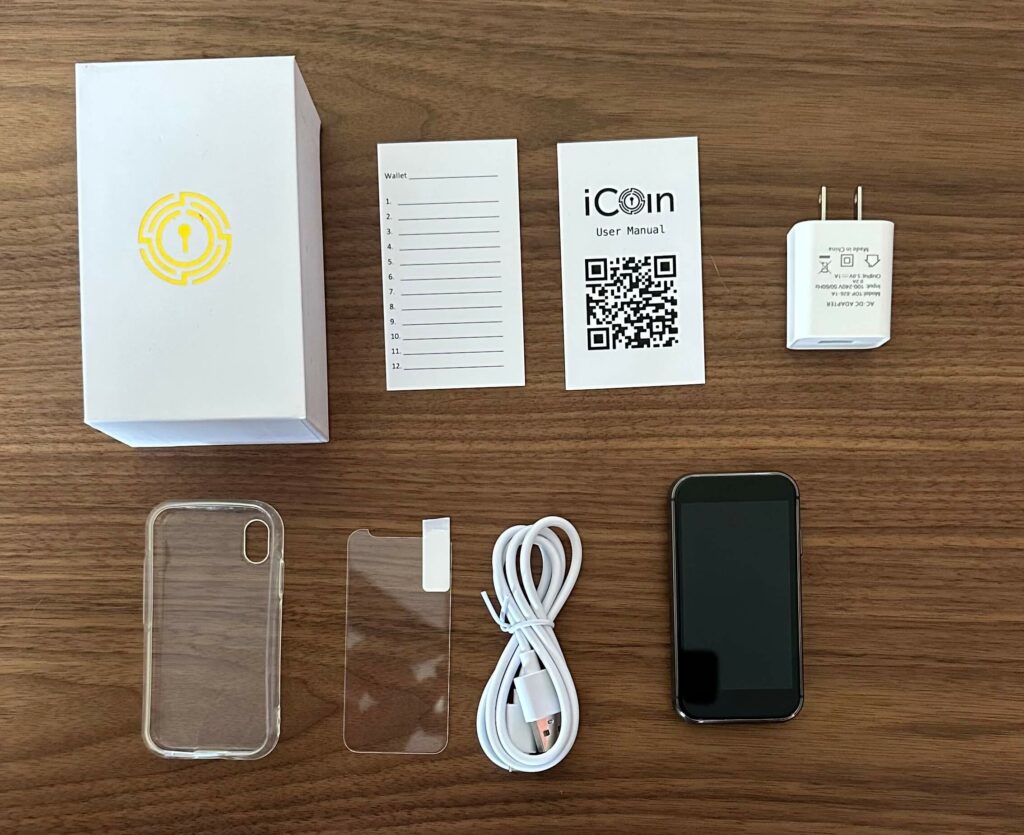
The iCoin Wallet can be bought as a standalone product, however it also comes in a bundle package with the iCoin printer.
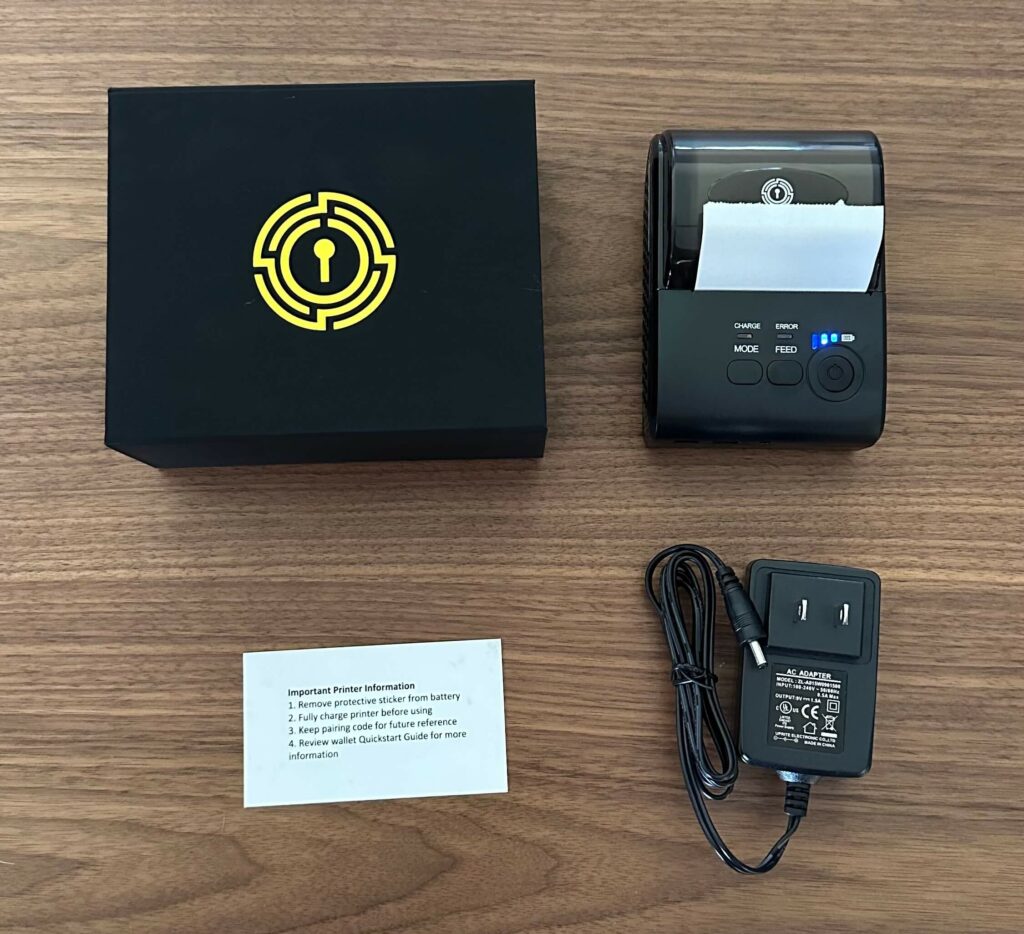
If you opt for the wallet & printer bundle, the printer box contains one iCoin printer loaded with paper, a wall charger and an instruction card. The printer is very small, and is essentially a receipt printer, similar to those you see in physical stores.
iCoin Wallet Supported Coins
The iCoin wallet is designed for storing Bitcoin and Ether, however it also has native support for Ethereum tokens such as ERC-20 tokens and NFTs. This enables the wallet to store thousands of assets.
- Bitcoin (BTC)
- Ethereum (ETH)
- Tether (USDT)
- USD Coin (USDC)
- Lido Staked Ether (STETH)
- Polygon (MATIC)
- Dai (DAI)
- Wrapped Bitcoin (WBTC)
- Chainlink (LINK)
Keep in mind that this does not include coins and tokens from other popular blockchains. Coins such as Litecoin, Dogecoin, Solana, Cardano and Polkadot are NOT supported by the iCoin wallet.
How Do I Setup My iCoin Wallet?
Use this guide to securely set up your iCoin hardware wallet, protect your crypto assets, and get started quickly.
-
Turn on iCoin Wallet & Set Up a PIN
Turn on the iCoin wallet device by holding down the side button. Follow the on-screen instructions to create a security PIN.
After confirming the PIN, select “Create new wallet.”
-
Record & Verify Your Seed Phrase
Your iCoin wallet will generate a 24-word seed phrase — your private backup key.
Write the phrase down manually on the provided seed card, or print it using the iCoin printer if available.
Verify the seed phrase by scanning the QR code from the printout or confirming manually on the wallet.
Store your seed phrase securely and never share it as anyone with access to it can control your funds.
-
Create a Wallet Account
Generate a wallet account to receive funds.
On the iCoin device, choose Bitcoin or Ethereum and press the yellow “+” next to “Accounts.”
Name your account and tap “Confirm.”
You now have a public key to receive crypto. Enter the address or scan the QR code using another wallet.
-
Download the iCoin Mobile App & Sync Accounts
Download the official iCoin mobile app to view balances and manage transactions.
Sync your accounts securely. Transactions are signed offline by the device, protecting your private keys and seed phrase.
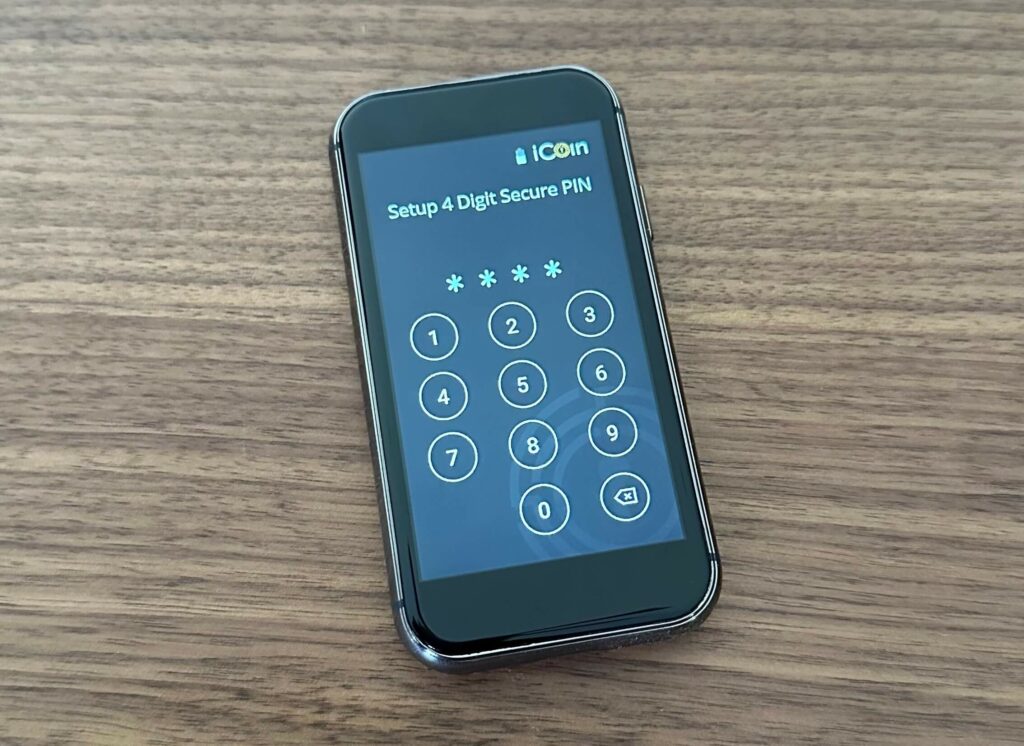
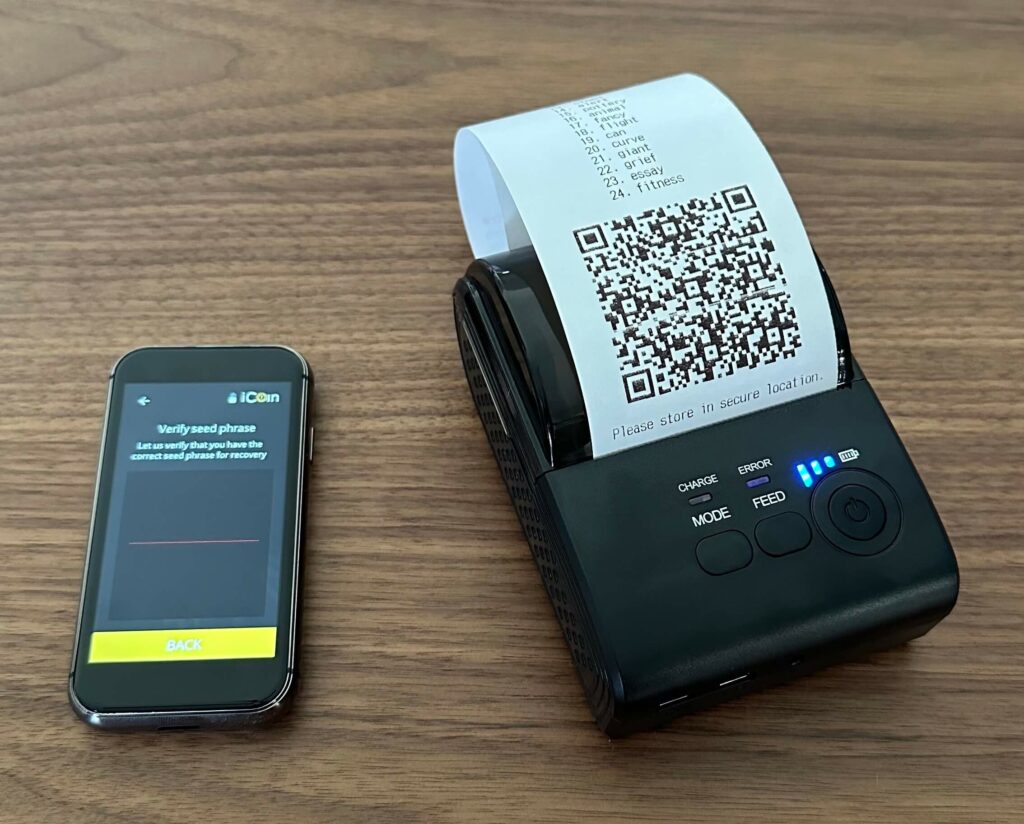
Your iCoin wallet is now ready to use! Keep it secure and enjoy safer crypto storage.
Personal Usage Experience
The iCoin wallet may have been the most intricate hardware wallet I’ve used yet – but it was surprisingly simple compared to how I thought it may be.
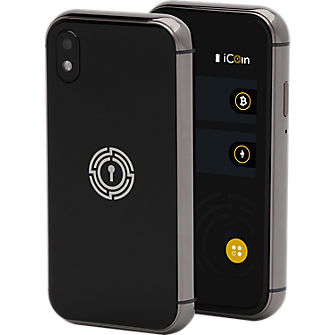
The device itself looks like a miniature iPhone, and feels very high quality. The touch screen was very responsive and worked fantastically, which was a relief since touch screens can often be hit or miss.
Overall, the Wallet, printer and app worked very smoothly together, and the process was fun, effective and simple.
The device and printer do feel a little overkill after using some other very simple hardware wallet alternatives, however it is really handy to print 24-word seed phrases rather than manually writing down every single word – If you create a lot of separate cold storage accounts, this could be really handy for streamlining the process. In addition, you can also scan the printed QR code to restore a wallet using the device’s camera, rather than typing in the whole seed phrase! Super handy.
One last useful feature is the ability to print receipts of your transactions, if you wish to keep track of your remittances.
The iCoin Wallet now includes an optional Bluetooth feature for quicker mobile syncing while maintaining air-gapped security. Chambyr allows encrypted messages to be transferred via QR codes, eliminating the risk of interception over traditional network routes. The iCoin printer remains useful for printing seed phrases with Chambyr’s secure messaging feature.
The iCoin Wallet is designed to maximize security by keeping private keys completely offline.
Pros
-
Touchscreen interface makes navigation easy and user-friendly.
-
Air-gapped security keeps private keys completely offline.
-
Optional printer provides a quick and secure way to store seed phrases.
-
High-quality build gives it a premium feel, similar to modern smartphones.
-
Easy setup process with step-by-step guidance.
-
Supports Bitcoin, Ethereum, ERC-20 tokens, and NFTs for basic crypto storage.
Cons
-
Limited cryptocurrency support—does not support Litecoin, Solana, Cardano, or other major blockchains.
-
Higher price point compared to alternatives like Ledger or Trezor.
-
Printer may feel unnecessary for users who don’t need paper backups.
How Much Does the iCoin Wallet Cost?
The iCoin Wallet as a standalone device costs $199, which is a very similar price to the Trezor Model T – the touch screen edition of the very well-known Trezor wallet.
If you want the printer too, the wallet-printer bundle will cost you a total of $249.
This is definitely a much higher price than more basic hardware wallet alternatives, however the touch screen is definitely much nicer to use than the physical buttons and miniature screen on standard devices. However, at the time of writing, the iCoin Wallet has been available at a discounted price of $149.25, and the Wallet & Printer bundle is priced at $186.75. So keep an eye for latest prices on the website.
Best Wallet: A Top-Rated Back-up Option
Best Wallet could well be the brand users might want to try if the iCoin wallet falls short of their expectations. Every kind of tool comes with its fanbase and naysayers alike, and the category of hardware wallets is no exception. Some users might find the software version of this payment solution more to their taste, and this is where my recommendation comes in.

Best Wallet is an all-in-one software wallet and crypto exchange that combines ease of use with rock-solid security. Upcoming features include a desktop browser extension, integrated staking support, cross-chain swapping capabilities, and the introduction of the Best Token. Future enhancements also aim to support more blockchain networks in addition to current ones, including Polygon and BNB Smart Chain. There are also plans to introduce portfolio management tools.
Supporting a wide range of blockchains, it’s an ideal choice for those seeking a versatile and affordable storage solution without the need for hardware.
Conclusion – Is the iCoin wallet Worth It?
The iCoin wallet and printer are an amazing couple of devices, but definitely on the higher end of the price scale for hardware wallets.
That being said, the iCoin wallet’s build quality is excellent, and definitely up to par with expectations for the price tag. The printer also adds extra ease to an already-smooth user experience.
In my opinion, the iCoin wallet is great but only necessary if you plan to produce a large number of different cold storage accounts. Either that, or you value a more premium experience and setup process enough to justify the extra money.
Keep in mind you can only store Bitcoin, Ether, and Ethereum-related tokens on this device – perhaps an underwhelming range of supported assets for a premium device.
iCoin Wallet
$199
Pros
- High-quality build
- Easier to use than physical button devices
- Doesn’t require a computer
- Print private keys for unlimited accounts
Cons
- Expensive
- Limited support of alternative blockchains
FAQs
What is the iCoin Hardware Wallet?


The iCoin Wallet is a touchscreen hardware wallet designed to store cryptocurrencies securely offline. It features air-gapped security and an optional printer for easy backup of seed phrases and private keys.
Which cryptocurrencies are supported by the iCoin Wallet?
The wallet supports Bitcoin (BTC), Ethereum (ETH), ERC-20 tokens, and NFTs (ERC-721 tokens). However, it does not support coins from several top blockchains.
How do I set up the iCoin Wallet and Printer?
Power on the wallet, set a PIN, and generate a 24-word seed phrase for backup. You can write it down or use the iCoin printer to print it. After verifying your seed phrase, create a wallet account, add a Bitcoin or Ethereum address, and sync with the iCoin mobile app to manage transactions.
What is included in the iCoin Wallet package?
The standard package includes the iCoin Wallet, a USB-C charging cable, a wall charger, a protective case, a tempered glass screen protector, a user manual, and a seed phrase card. The wallet and printer bundle also includes an iCoin printer, charger, and a roll of paper for backups.
How much does the iCoin Wallet cost?
The iCoin Wallet regularly costs $199, while the wallet and printer bundle is priced at $249. Prices may vary due to offers and sales, so it’s best to check the official iCoin website or authorized retailers.
References:
- MetaMask. “MetaMask.” Metamask.io, MetaMask, 2019, metamask.io/.
- “What Is a Crypto Wallet?” @Coinbase, Coinbase, 2025, www.coinbase.com/en-in/learn/crypto-basics/what-is-a-crypto-wallet.
- “ICoin.” ICoin, 2025, www.icointechnology.com/.

Why you can trust 99Bitcoins
Established in 2013, 99Bitcoin’s team members have been crypto experts since Bitcoin’s Early days.
Weekly Research
100k+Monthly readers
Expert contributors
2000+Crypto Projects Reviewed