

In This Article
Perhaps one of the oldest players in the Bitcoin wallet market is Electrum. In this review, we will cover what is Electrum wallet is and cover the wallet’s pros and cons. We will also share our personal experience with it.
Key Takeaways
Electrum Review Summary
Electrum is a Bitcoin desktop wallet that is feature-rich but not very user-friendly. If you’re just getting started with Bitcoin, I recommend avoiding Electrum, but if you’re already familiar with the basic terms, then this is an excellent choice.
That’s Electrum in a nutshell. For a more detailed review, keep on reading. Here’s what I’ll cover:
- Electrum Overview
- My Personal Electrum Experience
- Supported Coins
- Customer Support and Reviews
- Best Wallet
- Conclusion
1. Electrum Overview
Created in November 2011 by Thomas Voegtlin, Electrum has since been modified by various developers (the code is open source). Electrum is a client-based wallet – meaning that in order to use it, you need to download and install it on your computer.
The client is only available for desktops, which is a significant downside for users who wish to use their mobile as their wallet.
Electrum prides itself on being fast, safe, and private. The wallet is a lite wallet, meaning it does not download the blockchain, so there are no delays on setup, and it’s always up-to-date.
Your private keys are encrypted, and you never leave your computer. Your wallet can be recovered from a secret phrase (also known as a seed phrase). You can also keep your private keys offline and go online with a watch-only wallet.
Your private key is also not shared with the server connecting Electrum to the Bitcoin network. The server does not store user accounts. You are not tied to a particular server, and the server does not need to know you.
Finally, Electrum is developed to support hardware wallets such as TREZOR or Ledger. This means your private key will be stored safely offline on the hardware wallet, while you can use Electrum’s interface to send coins whenever you wish to do so.
2. My Personal Electrum Experience
Many consider Electrum to be the best Bitcoin desktop wallet, hands down. I wanted to take a look at Electrum from a newbie’s point of view since it always seemed to me that the wallet is too complex.
The installation process
While the installation process is pretty simple and straightforward for experienced Bitcoiners, I’m not sure how intuitive it would be for someone who’s just taking his first steps in the cryptocurrency world.
Basically, just clicking “Next” all the time is probably the preferred setup for newbies. However, there’s no tooltip or summary in place to explain what the various steps are all about, as seen below:
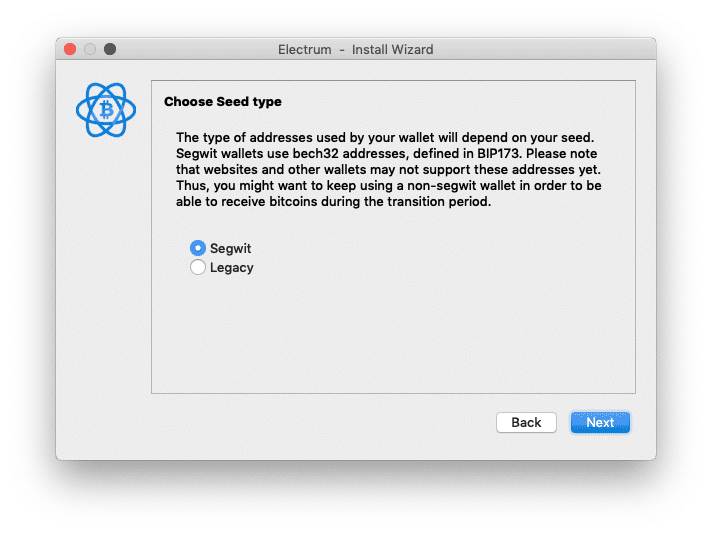
At least the seed phrase which is the most important part is explained in a bit more detail:
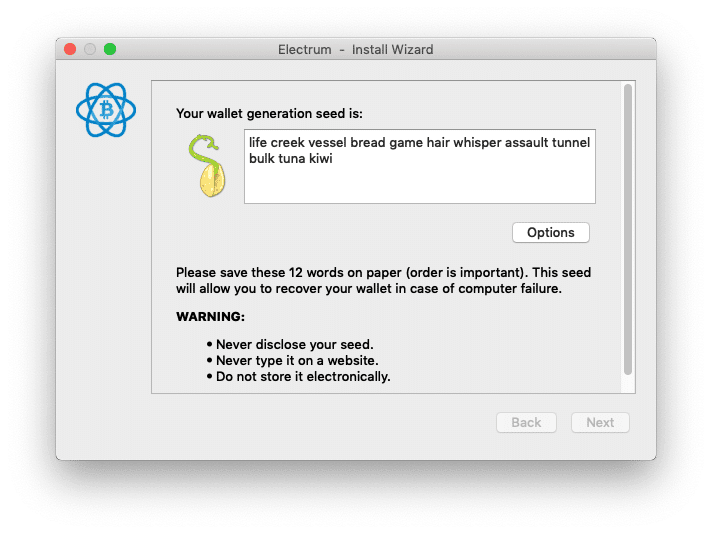
Note – you should never expose your seed phrase online. The seed you see above is for instructional purposes only and I am not using it to store funds.
The whole installation process is comprised of 7 steps which include:
- Choosing a server
- Naming your wallet.dat file (the file that stores your private key)
- Choosing between a Legacy and a Segwit wallet
- Choosing between an existing wallet/hardware wallet / new wallet
- If creating a new wallet – choosing the wallet type (standard, 2fa, multisig)
- Writing down your seed phrase
- Creating and encrypting (optional) your wallet password
As you can see, this is probably a bit more than the average non-technical newbie will be able to handle. Take a look at Exodus to see how newbie onboarding is done.
The user interface
The user interface of the wallet’s desktop client is pretty straightforward. Three tabs at the top of the window allow you to choose between “send,” “receive,” and your transaction history.
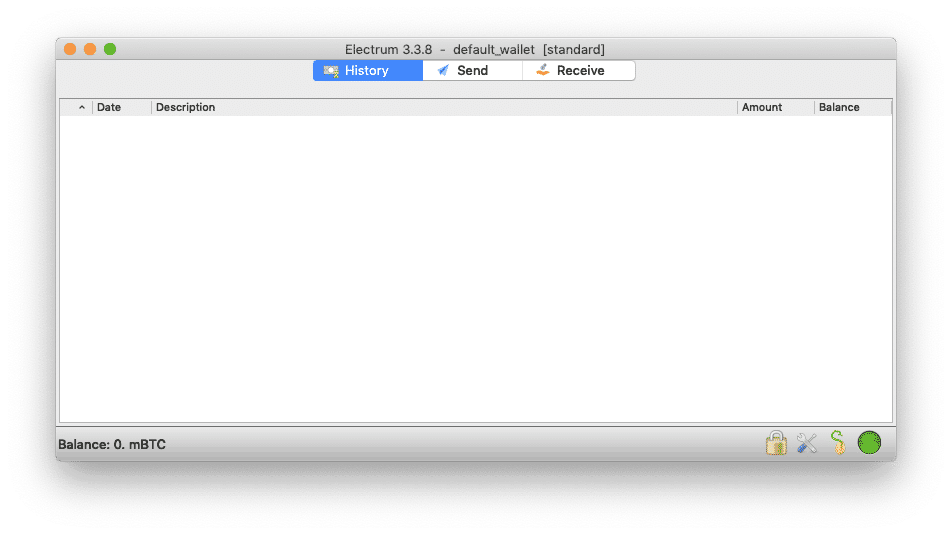
At the bottom of the window, you have the option to view system settings, inspect your seed or change your password.
All in all, the design is pretty simple yet not quite inviting. It seems like Electrum focuses on functionality rather than on user experience. If someone new to Bitcoin downloads this wallet, chances are they wouldn’t know what to make of all the options the wallet offers.
Feature-rich
The upside of Electrum is that it’s feature-rich, mainly when it comes to customizing your Bitcoin transactions.
The wallet allows you to set custom transaction fees. Electrum also supports the Replace By Fee feature (RBF) that allows you to rebroadcast your transaction with a higher fee if it doesn’t get confirmed.
You can label different addresses for reference so you know where payments are coming from. There’s also an easy way to export all of the wallet’s history, addresses and labels.
Additionally, the wallet allows you to sign messages using your private key and also “pay to many”, which is the process of sending one transaction to multiple recipients.
What’s New With Electrum Wallet?
If it’s been a while since you last looked at Electrum, you’ll probably notice it’s come a long way. It’s still fast, light, and non-custodial, but there’s a lot more going on under the hood now, especially if you’re into Lightning, swaps, or want tighter control over your wallet setup.
Here’s a quick look at everything that’s changed recently.
Major Update: Electrum 4.6.2
The latest version is Electrum 4.6.2, and it packs some big improvements.
One of the most noticeable changes is how plugins work. You can now install third-party plugins as zip files directly from the desktop app. To keep that safe, Electrum added a plugin authorization password. This is separate from your main wallet password and blocks any unauthorized plugin installs, even if someone tried to sneak something in.
If you’re on Windows, there’s also a new screenshot protection feature. It helps prevent sensitive wallet info from showing up in screenshots, which is especially useful if you’re screen sharing or recording tutorials.
Electrum also continues to provide reproducible builds, and all official releases are signed by multiple developers. That way, you can verify the download matches the source code.
Lightning Gets Way More Useful
Electrum’s Lightning support has improved with new features. New channels now use anchor channels by default, which makes fee handling better when it’s time to close a channel.
However, there’s a small catch. Lightning only works with wallets that use software keystores. So if your keys are stored only on a hardware wallet or it’s a watch-only setup, Lightning won’t be available.
If you’re using both on-chain and Lightning, the experience is smoother now and easier to manage.
Submarine Swaps (Yes, That’s a Real Thing)
One of the biggest updates is submarine swap support. These let you move between on-chain BTC and Lightning without needing a centralized service.
Electrum uses Nostr to discover swap providers automatically. You don’t have to manually configure anything. And to make things safer, Electrum removed support for zero-confirmation swaps.
If you’re more technical, you can even run your own provider using the built-in swapserver plugin, which is fully documented and ready to go.
Nostr Plugins: Remote Control and Multisig Made Easier
Electrum also added some powerful Nostr-based plugins:
- Nostr Wallet Connect (NIP-47) lets you remotely control your Electrum Lightning wallet through Nostr relays. You can link it with external tools or apps, without exposing your private keys.
- Nostr Cosigner helps multisig users exchange and sign PSBTs (Partially Signed Bitcoin Transactions) over Nostr instead of relying on email or file transfers.
These are more advanced features but super helpful if you’re working with multisig setups or remote Lightning access.
Better Privacy and Transaction Control
Electrum has always been strong on privacy, and it keeps getting better.
There’s now built-in dust protection, which helps defend against dust attacks that try to track your activity. You also get an option to avoid spending from used addresses, making your transactions harder to link together.
These features are great for users who like to manually select UTXOs and keep their transaction history more private.
3. Supported Coins
Electrum supports only Bitcoin (BTC). However, there have been clones created for Bitcoin Cash, Bitcoin Gold, and other coins.
4. Customer Support and Reviews
Electrum does have very extensive documentation online, as well as an active BitcoinTalk category where you can get your questions answered.
While there aren’t many online reviews of the wallet, the Bitcoin community, in general, praises Electrum as being one of the best possible choices for small amounts of Bitcoin.
5. Looking for a Free Mobile Wallet Alternative?
Best Wallet
As beloved as Electrum is of Bitcoin devotees, those interested in investing in crypto and looking for simpler wallet options might want to check out software wallets. Many of these also fulfil the double function of decentralized wallets, and come complete with anonymity and a host of other features.
A prime example of this is Best Wallet, the hotly touted new brand that was released in different phases. If you’re exploring simpler and more versatile options, Best Wallet is a great alternative, here’s why:
- Multi-chain support allows management of hundreds of coins across blockchains without much hassle.
- As a non-custodial wallet, you retain sole access to your private keys, ensuring full control of your assets.
- Features such as two-factor authentication, biometrics, and encrypted keys keep your funds safe.
- Swap or trade tokens with minimal fees using the built-in decentralized exchange.
- Custom Token Management: Add and manage unique or lesser-known tokens effortlessly.
- Earn passive income by staking directly within the wallet.
- An intuitive design makes it ideal for new users while advanced tools cater to experienced traders.
- Available for Android and iOS, with a browser extension for desktops next in line.

Why Choose Best Wallet?
Best Wallet stands out as a non-custodial crypto wallet built for both beginners and experienced traders. The wallet supports several blockchains including popular names such as Bitcoin, Ethereum, Polygon and BNB Chain. Best Wallet is built to be a complete solution for storing, managing and trading digital currencies, while ensuring that users remain full control and privacy. Its intuitive design makes onboarding far easier and more seamless than many other wallets in the market.
Key features on Best Wallet that may interest you are: a built-in decentralized exchange aggregator, token launchpad, native platform token and cross-chain swaps.
Download Best Wallet6. Conclusion
Electrum is a great, fast, secure, and stable wallet. However, it is not suitable for beginners. The wallet enjoys massive support from the Bitcoin community and is extremely feature-rich.
If you’re just starting with Bitcoin, I wouldn’t suggest this wallet, but if you know your way around the basic terms, Electrum is highly recommended (hey, I use it myself).
Electrum wallet
Free
Pros
- Vert fast
- Good safety features
- Privacy is kept
Cons
- Not beginner friendly
FAQs
What is Electrum Wallet?

Electrum is a lightweight, open-source Bitcoin wallet created in 2011. It’s a desktop-based wallet designed for speed, security, and advanced functionality. Unlike beginner-focused wallets, Electrum gives users full control over their private keys and allows for features like custom transaction fees, Replace-By-Fee (RBF), multisig support, and integration with hardware wallets such as Trezor and Ledger.
How Secure is Electrum?
Electrum is password-protected and can also encrypt the private key on your hard drive. If the password is lost or the computer is destroyed, you can always recover your funds with the seed phrase (assuming you wrote it down during the wallet setup).
Does Electrum Support Bitcoin Cash?
No, Electrum supports BTC only. However, there is Electron Cash which is an Electrum clone for Bitcoin Cash.
How to use electrum wallet for social impact investing?
Use Electrum to securely hold Bitcoin, then direct funds to verified social impact projects or platforms accepting BTC, ensuring transparency and traceability.
Is Electrum Wallet safe?
Yes, Electrum Wallet is considered safe. However, users have to take the responsibility to secure their Electrum Wallet by protecting seed phrases and passwords, and staying alert to hacks and scams.
Is Electrum a good wallet?
According to 99Bitcoin’s review, Electrum is a Bitcoin desktop wallet that is feature-rich but not very user-friendly.

Why you can trust 99Bitcoins
Established in 2013, 99Bitcoin’s team members have been crypto experts since Bitcoin’s Early days.
Weekly Research
100k+Monthly readers
Expert contributors
2000+Crypto Projects Reviewed