






In This Article
- D’CENT Wallet vs Trezor: Quick Summary
- Trezor Hardware Wallet vs D’CENT: Supported Cryptocurrencies
- D’CENT Wallet vs Trezor: Web3 & dApps
- Trezor vs D’CENT Biometric and Card Wallet: User Experience
- Mobile Apps for Trezor and D’CENT Wallets
- D’CENT Wallet vs Trezor: Key Features Compared
- D’CENT vs Trezor: Customer Service & Support
- D’CENT vs Trezor: Regulation and Security
- D’CENT Wallet vs Trezor: Our Verdict
Crypto may be creating millionaires, but it’s also creating victims at a record-breaking pace. Scam operations have evolved from clumsy phishing attempts into professionalized, industrial-scale fraud networks. In 2024 alone, wallets tied to crypto scams collected at least 9.9 billion dollars in stolen assets, and the problem keeps getting worse, with scam-related activity rising roughly 24 percent every year since 2020. High-profile rug pulls like Fintoch, multi-million-dollar phishing dragnets on Ethereum and Solana, and relentless seed-phrase “support scams” pushed through social media all serve as brutal reminders: if you own crypto, you’re a target.
This surge has made secure storage more than just a best practice. It is now a survival skill. Exchanges get hacked, browser extensions get cloned, users get tricked, and even seasoned traders fall for increasingly convincing impersonation attacks. The only proven defense is to control your own keys. The safest way to do that is with a hardware wallet.
That brings us to this guide. If you’re choosing between D’CENT and Trezor, you’re already taking security seriously. Both brands offer self-custodial, offline protection, but they take very different approaches to design, features, biometrics, usability, and coin support. In this article, you’ll get a full D’CENT Wallet vs. Trezor comparison, breaking down each device in their lineups and helping you decide which one truly fits your needs.
Let’s dive in and find the wallet that will actually keep your crypto safe.
D’CENT Wallet vs Trezor: Quick Summary
D’CENT wallets support over 4,600 cryptocurrencies and come with a companion app that can serve as its own software wallet. The Card wallet resembles a bank card and signs transactions in-app via NFC connection. The Biometric Wallet features a fingerprint scanner, multi-wallet support, and gasless transactions, all of which enhance the Web3 experience.
Trezor wallets are known for their high security and open-source software, with Model One being among the oldest hardware wallets around and yet remaining near-impenetrable. The newer Safe lineup comes with CC EAL6+ Secure Element Chips, while the premium Safe 5 offers a color touchscreen that makes it very easy to operate. The wallets can store thousands of cryptocurrencies. Both the D’CENT Wallet and Trezor make our list of the best crypto wallets. This guide should help you decide which one is best for your needs.
- D’CENT Biometric Wallet offers biometric login, fingerprint transaction signing, multi-wallet support, and gasless transactions.
- Trezor devices come with open-source software, so anyone can verify their robust security.
- D’CENT devices store over 4,600 cryptos on more than 84 networks. The number of cryptos that Trezor wallets can store is in the thousands, as well.
| Feature | D’CENT Biometric | D’CENT Card | Trezor Safe 5 | Trezor Safe 3 | Trezor Model One |
| Coins supported | 4,600+ | 4,600+ | 1,000+ | 1,000+ | 1,000+ |
| Mobile app | D’CENT Mobile App (Android, iOS) | D’CENT Mobile App (Android, iOS) | Trezor Suite App (macOS, Windows, Linux, iOS, Android) | Trezor Suite App (macOS, Windows, Linux, iOS, Android) | Trezor Suite App (macOS, Windows, Linux, iOS, Android) |
| NFT support | Yes, in app | Yes, in app | Yes, through third-party apps | Yes, through third-party apps | Yes, through third-party apps |
| Price (approx) | $159 | $40 | $169 | $79 | $49 |
| dApp explorer | Yes, in app | Yes, in app | No, only through third-party apps | No, only through third-party apps | No, only through third-party apps |
| Unique features | Biometric lock, multi-wallet support, gas-less transactions, automatic software verification, 4 buttons, wide OLED display | Credit card shape and size, safety in simplicity, backup included, native EVM support | Color touchscreen, haptic feedback, Gorilla Glass 3, highly convenient | Low price, easy to use, two-button system, identity protection with Tor | Most affordable Trezor wallet, up to 50-digit PIN, robust security after a decade in use |
What Are D’CENT Wallets and Trezor Hardware Wallets?
The D’CENT lineup refers to the main D’CENT biometric wallet and the D’CENT card wallet.
The Trezor products include the entry-level Model One, the mid-range Safe 3, which strikes a balance between price and features, and the top-grade Safe 5, Trezor’s most exclusive wallet, featuring a color touchscreen and plenty of storage.
If you want to see how D’CENT fares against Trezor’s main competitor, Ledger, check out our D’CENT Wallet vs Ledger Nano X comparison guide.
Before we begin the detailed D’CENT vs Trezor comparison journey, let’s review the individual lineups.
D’CENT Wallets Overview
D’CENT Biometric Wallet is D’CENT’s flagship product. This hardware wallet resembles an old MP3 player or a small remote, much like Trezor, and its biometric features are its main selling point.
The device comes with a fingerprint scanner designed for unlocking and signing transactions, which is much safer than the standard PIN-based model that the majority of hardware wallets use. It has four buttons for easy usage and a small OLED display.
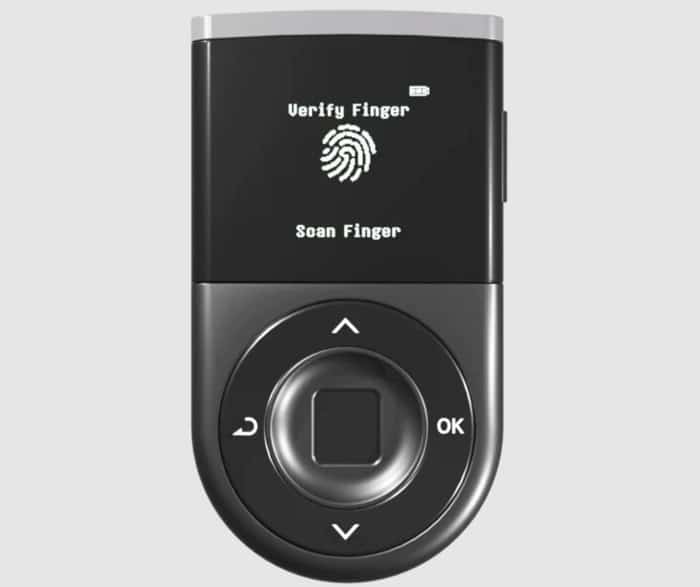
The wallet lets you store over 4,600 cryptocurrencies from 84 networks. It boasts a CC EAL5+ certified Security Chip that stores and encrypts your private keys offline. In addition, communication is encrypted through Bluetooth, ensuring external forces can’t jeopardize it.
The hardware wallet pairs with the D’CENT mobile app, which unlocks additional services like a dApp explorer, NFT support, instant asset tracking, swapping, and more. With the v8.1.0 update introduced in 2025, D’CENT added multi-wallet support to allow users to create up to 100 app wallets, managed by a single interface. Users can also import wallets from third-party providers such as MetaMask and Phantom on D’CENT. The upgrade came after the introduction of the GasPass program to allow fee-less transactions to D’CENT users on select blockchains such as Ethereum, Solana, and Base.
You can learn more about the device in our full D’CENT Wallet review.
The other wallet in the lineup is the D’CENT All-in-One Wallet or D’CENT Card Wallet. It’s the company’s simpler and cheaper alternative, and among the most affordable ones on the market. The security is still top-notch, with the device keeping everything offline on a Certified Secure Chip.
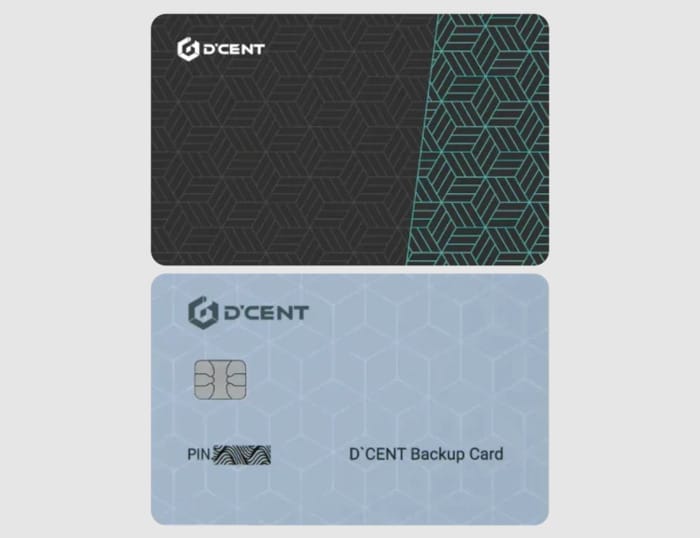
There’s also the added security in the simplicity of the device, which is essentially a card with NFC capabilities for connecting to your phone and the D’CENT mobile app. Everything is protected and accessed with a PIN, unlike the D’CENT Biometric Wallet.
The wallet also has native support for EVM assets, or over 3,000 tokens on Ethereum, and more than 27 added EVM-compatible networks.
By purchasing the card wallet, you get an added card as backup, which you can use to create a duplicate of your original wallet. On top of that, D’CENT lets users, primarily businesses, get customized cards with unique, personalized designs.
Get a D’CENT Biometric Wallet or a D’CENT Card Wallet today!
Trezor Hardware Wallets Overview
Trezor Model One is the company’s entry-level wallet that’s also highly cost-effective, more than three times cheaper than the top-notch Safe 5. It’s one of the oldest hardware wallets on the market, yet it still boasts near-perfect security. You get to set a passphrase and a PIN with up to 50 digits.
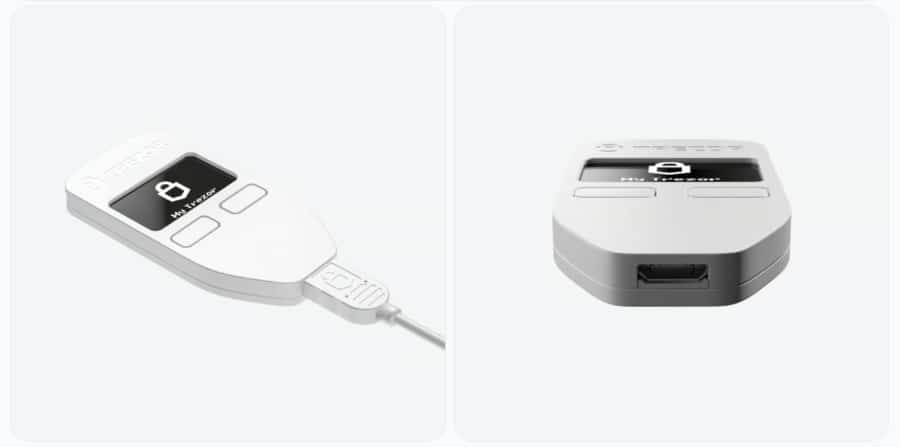
It features Trezor’s distinct design, akin to old media players or smaller remotes. There are only two buttons and a 0.96″ Monochromatic OLED screen, so most of the daily use goes through the Trezor Suite app. Also, the device has the old Micro USB connection.
You can learn more about Model One in our detailed Trezor Model One review.
Trezor Safe 3 is the company’s mid-range device, similar in design to Model One, with the same screen and button setup, but a USB-C connection. It comes in several colors, and you can even get a Bitcoin-only version.
The device uses the robust Secure Element Certified Chip (EAL6+) that’s used in bank cards and passports. The wallet is open-source, meaning everyone can verify its safety.
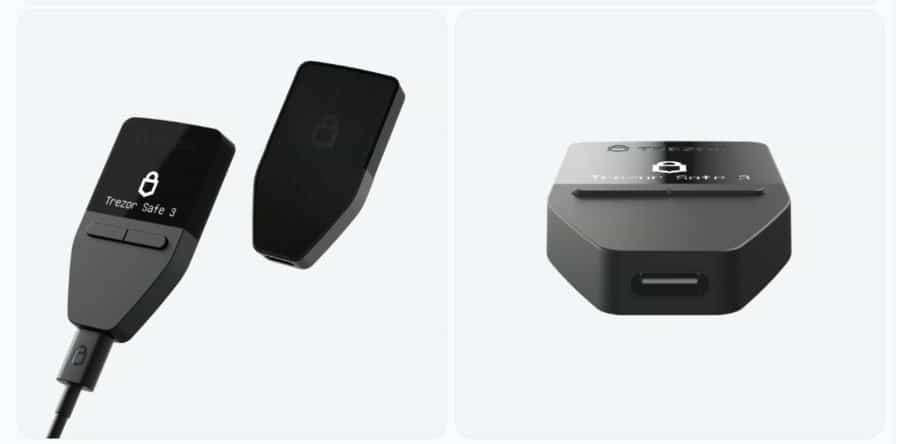
There’s the same PIN and passphrase protection, while the device also features identity protection with the help of Tor.
The box also comes with a two-way USB-C cable and two Wallet backup cards, as well as the start-up guide and some stickers.
To learn more about the device, read our full Trezor Safe 3 review.
If you want the very best Trezor has to offer, you should go for the Trezor Safe 5, the company’s newest and most exclusive device. It has pretty much the same quality features as the other two, and the design remains largely unaltered. However, it ditches the button setup and uses a 1.54-inch color touchscreen with Gorilla Glass 3 protection.
The device also has haptic feedback and even a MicroSD card slot. It’s protected by an EAL6+ Certified Secure Element Chip and an open-source design.
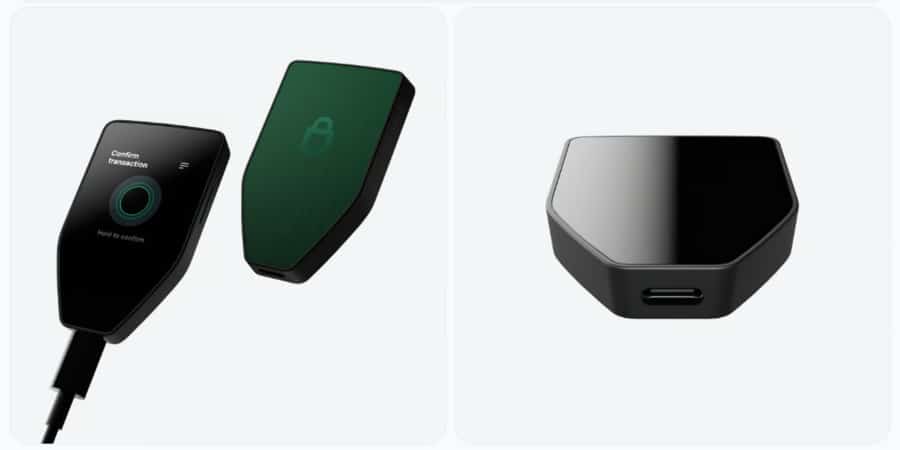
The device comes in three colors, and you can also get a Bitcoin-only version, like with Safe 3. In the box, you’ll find the wallet, a USB-C to USB-C cable, two 20-word backup cards, a start-up guide, and stickers.
Learn more about the wallet in our comprehensive Trezor Safe 5 review.
Get your Trezor Wallet today!
Visit TrezorTrezor Hardware Wallet vs D’CENT: Supported Cryptocurrencies
The main thing about the number of supported cryptos is that neither company provides exact figures for each wallet. However, both brands suggest that their wallets offer similar support across models.
There’s no way to know the exact number for every wallet, but both brands have dedicated pages where you can learn which exact cryptos are supported and which wallets they are available on.
- D’CENT wallets have clearer figures. They support over 4,600 cryptocurrencies and more than 84 mainnets or blockchain networks. You can learn which coins and tokens are available on the official D’CENT Wallet list.
- Trezor is more vague about the numbers, stating that its wallets support thousands of cryptos and a large number of networks. Even though the exact figures are unknown, you can still learn which coins and tokens are available and on which wallets from the official Trezor list.
Trezor likely supports a comparable range of coins and tokens to D’CENT, but it’s always wise to select a device based on the specific assets you plan to store or trade.
D’CENT Wallet vs Trezor: Web3 & dApps
As expected, since all these are hardware crypto wallets, none of them has native support for the broader Web3 realm and the dApp market. However, you can still access it and connect your wallets to dApps through the mobile apps.
The D’CENT Mobile App features a dApp explorer called the Discovery tab, where you can search for dApps and seamlessly connect your wallet to any of the compatible services. To do this, D’CENT uses WalletConnect, which simplifies the process by allowing you to scan a QR code to connect your D’CENT app with the desired service.
The dApp explorer supports the same blockchain networks as the hardware wallets, meaning you can connect to dApps built on over 80 networks. This includes Ethereum, home to many of the most widely used dApps, such as Uniswap (a leading decentralized exchange), OpenSea (a major NFT marketplace), and MakerDAO, the decentralized autonomous organization (DAO) behind the DAI stablecoin.
To trade a wide range of tokens on Uniswap, including niche or less commonly listed assets, initiate a connection by scanning the WalletConnect QR code displayed on Uniswap using your D’CENT app. This will securely link your hardware wallet to the platform, enabling you to execute trades and confirm transactions directly through your D’CENT device.
The multi-wallet support on D’CENT allows users to create multiple app wallets. Each app wallet can be tailored for specific purposes such as investing, staking, trading, gaming, and NFTs. Switching between these app wallets is seamless and enables users to organize their DeFi activities.
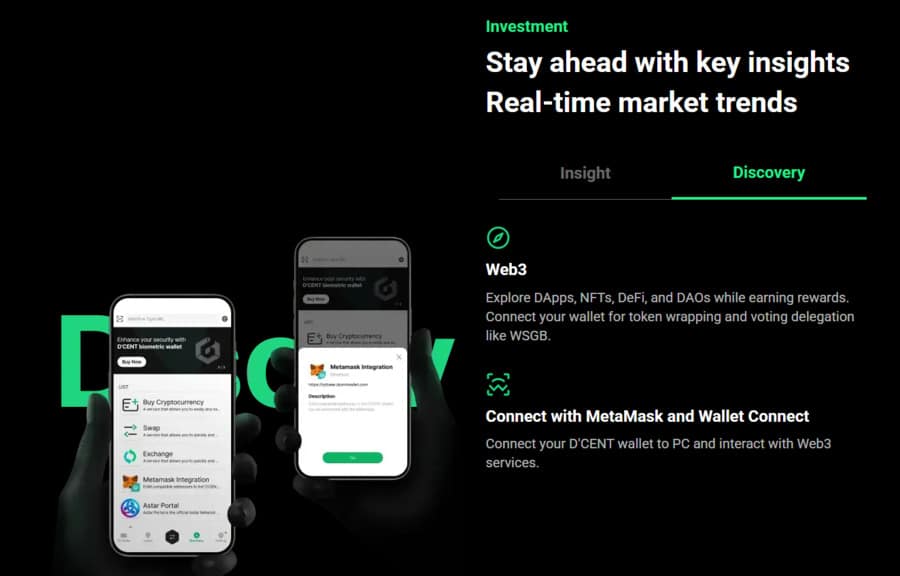
As for Trezor, it doesn’t feature such native support through its companion app, but you can still connect a broad range of third-party wallets that have their own dApp explorers, like MetaMask or Exodus.
This makes things slightly more complicated than in the case of D’CENT. However, due to the huge popularity of Trezor, you’ll still find a bunch of options that can connect seamlessly thanks to their established partnerships with Trezor.
Moreover, the Trezor Suite application continues to support WalletConnect, allowing users to connect with a variety of decentralized applications (dApps) as needed.
Trezor Suite also has some native support for important crypto investing features, like crypto swapping and staking. In other words, you can swap cryptos and stake some coins and tokens directly in the Trezor Suite app without the need for connecting to a third-party option.
Trezor vs D’CENT Fees
Since all of these are hardware wallets, we need to compare the upfront costs primarily. Then, we can focus on the fees, subscriptions, and other costs.
Purchase price
We can effectively separate all of these hardware wallets into three categories based on their prices:
- Low-cost: D’CENT Card Wallet ($40) and Trezor Model One ($49) fit here. They are the entry-level or affordable options that still have the same levels of security but fewer features and lower user-friendliness than the others.
- Mid-range: Only Trezor Safe 3 ($79) can be placed here. It’s a mid-range device, designed with ease of use in mind and a high degree of security.
- Top-tier: D’CENT Biometric Wallet ($159) and Trezor Safe 5 ($169) occupy this category, as they represent the best the two brands have to offer. They boast the strongest security features while maintaining a focus on ease of use.
Transaction fees
Being hardware wallets, none of these devices have fees. There are no subscription fees, and transactions only come with network fees, while the wallets themselves don’t take a cut.
However, if you’re using other functionalities that come through third-party services, like swapping, staking, buying crypto, and more, you’ll have to pay fees to their providers.
D’CENT introduced a notable upgrade in 2025, which allowed gas-less transactions for users transacting on select blockchains such as Ethereum, Solana, and Base.
Check the quick overview of Trezor vs D’CENT fees and pricetags in the table below.
| Device | Price | Transaction fees | Other fees |
| D’CENT Biometric Wallet | $159 | Only blockchain fees | Paid to a third party only if the service requires it |
| D’CENT Card Wallet | $40 | Only blockchain fees | Paid to a third party only if the service requires it |
| Trezor Model One | $49 | Only blockchain fees | Paid to a third party only if the service requires it |
| Trezor Safe 3 | $79 | Only blockchain fees | Paid to a third party only if the service requires it |
| Trezor Safe 5 | $169 | Only blockchain fees | Paid to a third party only if the service requires it |
Trezor vs D’CENT Biometric and Card Wallet: User Experience
The user experience varies across wallets and depends largely on the device’s design and the presence of a display. However, it’s important to state that most routine interactions come through the apps; you’ll primarily use the devices for signing transactions.
The user experience is largely the same on Trezor Model One and Safe 3. Both have a two-button pad and 0.96-inch monochromatic displays with 128×64 pixels.
As for Trezor Safe 5, the situation is completely different. It stands out as the most user-friendly option of all Trezor and D’CENT devices. It also features a bigger 1.54-inch color display with 240×240 pixels.
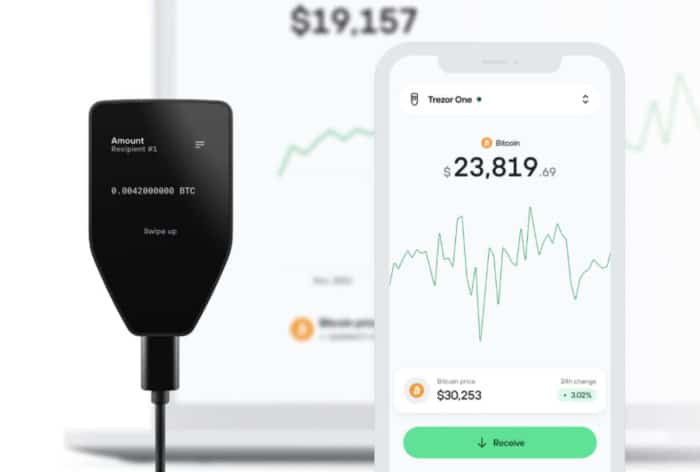
The inclusion of a standard color touchscreen combined with haptic feedback significantly enhances ease of use.
The same is true for the setup process. Still, Trezor has made sure to offer simple guides for starting up the device, creating a PIN, and setting up recovery phrases. You’ll also be using the Trezor Suite app from start to finish.
As for the two D’CENT wallets, the card wallet completely relies on the app, as you may have guessed. It is primarily used to connect to the phone via NFC for transaction confirmation. Due to this, there’s no point in making a D’CENT Card wallet vs Trezor UI comparison.
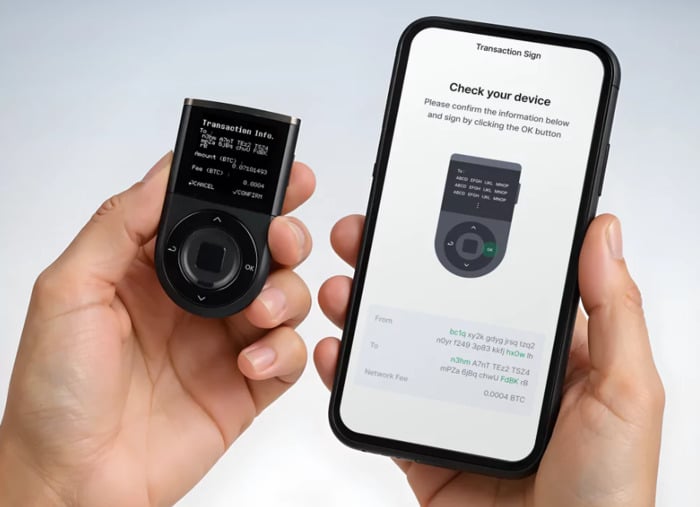
D’CENT Biometric Wallet is more user-friendly and somewhat similar to Trezor Model One and Safe 3. However, the four-button setup, a fingerprint scanner, and a 1.1-inch OLED display with 128×128 pixels make the basic functions it offers much simpler than those of the two Trezor devices.
D’CENT provides a streamlined setup process supported by a detailed onboarding guide. Users are walked through configuring a PIN, registering their fingerprint, and securely generating a recovery phrase, all directly on the device. Once initialized, the companion app becomes the primary interface for managing assets and executing transactions.
Mobile Apps for Trezor and D’CENT Wallets
Both Trezor and D’CENT offer companion mobile apps that streamline day-to-day interactions with their respective hardware wallets. However, to preserve overall security, all sensitive operations, such as transaction confirmations, are executed directly on the device.
D’CENT has an edge in this area, as its app is more robust, offering built-in functionalities that stem from its ability to function as a standalone software wallet, with its own accounts, addresses, and private keys. Furthermore, the D’CENT app now includes a multi-wallet manager (up to 100 app wallets) plus GasPass support on select chains to streamline first-time transfers and Web3 exploration.
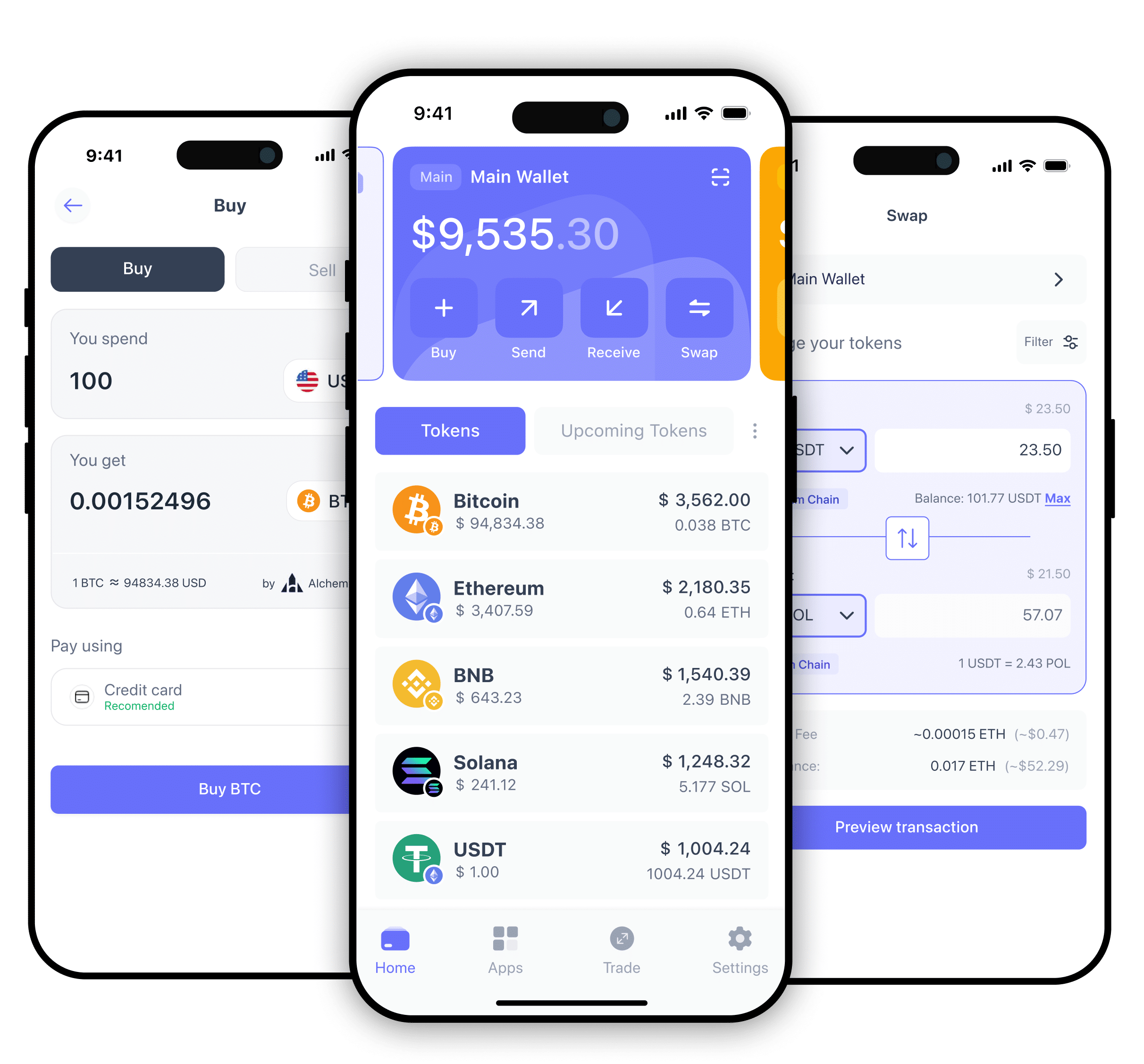
It works on Android and iOS, and it lets you monitor your assets, make transactions, buy and swap crypto, explore the Web3 market, and integrate services. You get to add new tokens, even if they are not featured, and you can explore your entire transaction history and get added info with a direct Explorer link. The app also stores NFTs, so you have an overview of what you own.
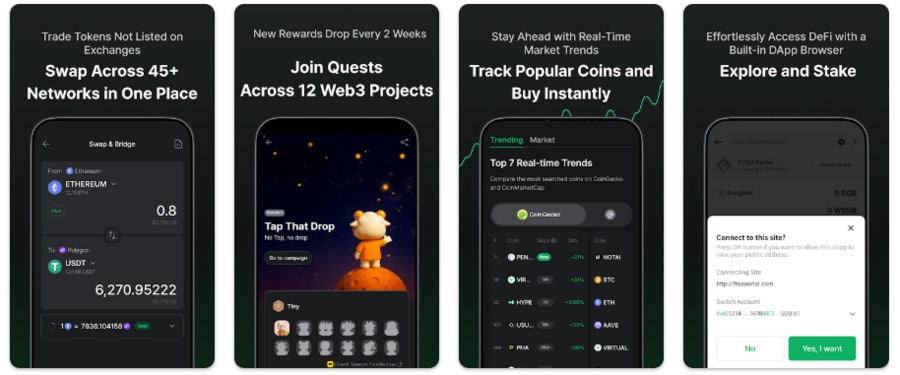
The swap feature is interesting as it covers as many as 39 networks, while it pools the best prices from DEXs, aggregators, and Web3 swap services.
Most importantly, the app has the ubiquitous Discovery tab that acts as your gateway to the massive world of dApps.
The Trezor Suite app is more of a standard companion app that can’t operate independently. It’s available on Android and iOS, but also macOS, Windows, and Linux. You can even use it directly in the browser.
The app is built to simplify crypto management and streamline the setup process for Trezor devices, making it more beginner-friendly.
Even though it’s a companion app, it still has a good deal of built-in features, including buying, swapping, and staking crypto, though staking is limited to ETH, ADA, and SOL.
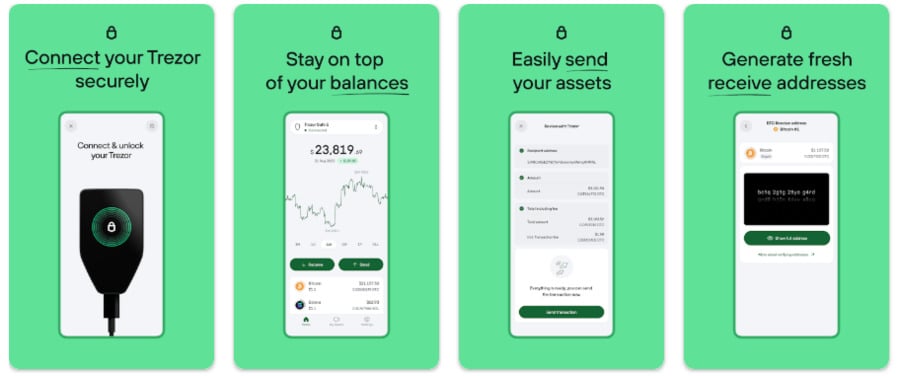
The app is built with a focus on security. It has a Discreet mode that hides sensitive information, address poisoning protection that detects and avoids problematic transactions, and scam airdrop protection that blurs and sorts scam airdrop tokens into a hidden section.
The app also comes with the Tor network, which makes it difficult for third parties to track your online activity.
D’CENT Wallet vs Trezor: Key Features Compared
Trezor Model One and Trezor Safe 3 are very similar in terms of features. Still, Safe 3’s status as a newer and more advanced version is evident in the improvements it brings to the table.
D’CENT Card Wallet has little to offer in this regard, with the unique feature being the NFC capability that makes signing transactions in the app convenient and safe.
D’CENT Biometric Wallet and the Trezor Safe 5 are the true stars here. D’CENT Wallet’s main selling point is the biometric scanner, while Trezor’s lies in the convenience of a color touchscreen and open-source firmware.
| Feature | Trezor Model One | Trezor Safe 3 | Trezor Safe 5 | D’CENT Card Wallet | D’CENT Biometric Wallet |
| User input | 2 physical buttons | 2 physical buttons | Touchscreen | None | 4 physical buttons and a fingerprint scanner |
| Display | 0.96-inch Monochrome OLED | 0.96-inch Monochrome OLED | 1.54-inch Color Touchscreen | None | 1.1-inch Monochrome OLED |
| Authentication | PIN | PIN | PIN | NFC and app | Fingerprint |
| Passphrase on-device | No | Yes | Yes | No | Yes |
| Secure Element Chip | No, uses a basic secure element | CC EAL6+ | CC EAL6+ | CC EAL5+ | CC EAL5+ |
| Open-source | Yes | Yes | Yes | No, uses proprietary firmware | No, uses proprietary firmware |
| dApp browser | No, relies on third-party wallets | No, relies on third-party wallets | No, relies on third-party wallets | No, accessed through the app | Yes, built in, accessed through the app |
| Multi-device support | Yes, through the app | Yes, through the app | Yes, through the app | Yes, through the app | Yes, through the app |
| Firmware updates | Yes | Yes | Yes | Yes, mandatory | Yes, mandatory |
| NFT marketplace | You need to connect to a third-party wallet that supports a marketplace | You need to connect to a third-party wallet that supports a marketplace | You need to connect to a third-party wallet that supports a marketplace | You can connect to one through the app | You can connect to one through the app |
D’CENT vs Trezor: Customer Service & Support
Customer support could be better with both options. D’CENT is very limited, and you can only use the ticket system with the agents responding only during working hours.
Trezor is the same here, but responses to tickets can take much longer, up to 3 days. It does have a live chat, but only with a bot and no human support.
D’CENT features a dedicated Help Center with an FAQ page. Trezor has a similar section, alongside a community forum.
| Customer support | D’CENT | Trezor |
| Live chat | No | Bot only |
| Phone support | No | No |
| Only in response to tickets | Only in response to tickets | |
| Ticket system | Yes | Yes |
| Availability | 10 a.m. to 5:30 p.m. KST Mon-Fri, daily one-hour lunch breaks from 12:30 p.m. to 1:30 p.m. | 24/7 with bots, slow replies (up to 3 days) through the ticket system |
D’CENT vs Trezor: Regulation and Security
Both companies fully respect the basic principles of the industry and provide near-impenetrable security for all of their devices.
Trezor Model One is the weakest link here, but only in the sense that it’s much older than all others, meaning it uses older technology. However, it has remained safe after a decade in circulation, so it holds its own in the Trezor Model One vs D’CENT battle.
The two Safe models use CC EAL6+ Secure Element Chips, while all Trezor models have open-source firmware, meaning independent parties can test them.
All of them feature 24-word wallet backups, while the Safe models also have 12-word and 20-word backups. PIN protection is available on all devices.
As for D’CENT wallets, they use CC EAL5+ Secure Element Chips, but they come with closed proprietary firmware.
D’CENT Card Wallet uses NFC connection to sign transactions in-app, where you can also use a PIN and set up a 24-word recovery phrase or opt to add a 25th word for extra security. Moreover, the card wallet comes with a backup card that’s effectively a duplicate of your main card wallet.
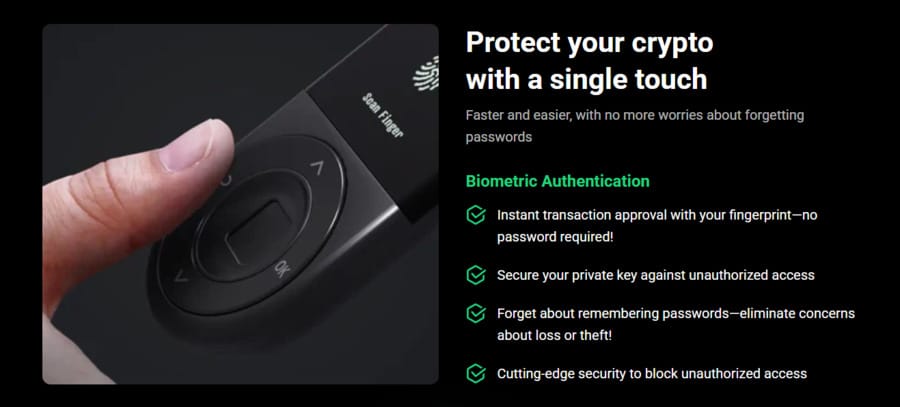
The D’CENT Biometric Wallet relies on a fingerprint scanner instead of PINs, although you can still create a PIN if you want to.
You can set up a 24- or 25-word recovery phrase, just like on the card wallet, while the device also performs an automatic software verification every time it’s turned on.
D’CENT Wallet vs Trezor: Our Verdict
The two D’CENT and three Trezor wallets all have something to offer:
- Trezor Model One is the company’s most affordable and oldest wallet. It’s well-suited for Bitcoin maximalists and beginners looking for excellent security at a low price.
- D’CENT Card Wallet is the simplest and easiest to use on the list, relying completely on the app and featuring a card format that makes it easy to carry around. It’s great for beginners and crypto holders on a budget.
- Trezor Safe 3 is similar to Model One but offers a newer chip and USB-C connection. It’s an excellent choice for security-conscious users, and its mid-range price point enhances its appeal to a wide audience.
- Trezor Safe 5 is the most advanced and user-friendly Trezor wallet. It’s ideal for experienced users who want both excellent security and a premium interface.
- D’CENT Biometric Wallet serves as the flagship model of the brand. It’s ideal for users who want a combination of strong security, convenience, and fast transactions that can be signed with a fingerprint. Integrated dApp explorer, multi-wallet support, biometric login, and gasless transactions are key features. If that’s what you need, order the D’CENT Biometric Wallet right now.
FAQs:
What is better than Trezor?


Unfortunately, I can’t offer a simple comparison, like Trezor Safe 5 vs D’CENT, because it all depends on what exactly you’re looking for. The key is to evaluate the devices you’re interested in, compare them with competitors, and then choose the exact wallet that suits most, if not all, of your needs.
Is the D’CENT Wallet secure?
Yes, all D’CENT wallets are incredibly secure thanks to Secure Element chips that let you create and store private keys on your device completely offline. Moreover, D’CENT Biometric Wallet has a fingerprint scanner for unlocking the device and signing transactions, which is far safer than the traditional PIN-based approach.
Who owns D’CENT?
IoTrust Co., Ltd. has developed and fully owns the D’CENT brand and its wallets. It’s a South Korean cybersecurity company founded by security experts with more than two decades of experience in the security and engineering space.
What is the most trusted cold wallet?
There’s no single contender here, but some of the most popular wallets include several Ledger and Trezor models, the two leading companies on the crypto hardware wallet market.
Can a D’CENT Wallet be hacked?
No, it’s almost impossible to hack a D’CENT Wallet as it’s a hardware wallet, and these are designed with high security. Plus, they all keep the most critical information offline, so hackers first need to get a physical hold of them. But even then, hacking is next to impossible due to high encryption levels.
What is the safest wallet in the world?
Most reputable hardware wallets can fit this bill because they offer cold storage for your crypto assets. This means private keys are kept offline and outside of reach of hackers, malware, and other cybersecurity problems.
What happens if I lose my D’CENT Wallet?
If you lose your D’CENT device, you don’t lose access to your crypto assets. As long as you have your recovery phrase, which is effectively a master key to your assets, you can restore your accounts on another D’CENT wallet.
References:
- National Institute of Standards and Technology. “Private Key.” NIST Computer Security Resource Center, https://csrc.nist.gov/glossary/term/private_key.
- Savvides, Marios. “Biometrics.” Carnegie Mellon University, Electrical and Computer Engineering Department, 2006, https://users.ece.cmu.edu/~jzhu/class/18200/F06/L10A_Savvides_Biometrics.pdf.
- Boston University. “Why Use 2FA?” Information Security | Boston University, https://www.bu.edu/tech/support/information-security/why-use-2fa/.
- “Multi-Wallet Feature.” D’CENT Wallet User Guide, userguide.dcentwallet.com/mobile-app/multi-wallet-feature.

Why you can trust 99Bitcoins
Established in 2013, 99Bitcoin’s team members have been crypto experts since Bitcoin’s Early days.
Weekly Research
100k+Monthly readers
Expert contributors
2000+Crypto Projects Reviewed