If you’ve ever sent ETH or interacted with a smart contract, you’ve probably seen that long, confusing list of details on Etherscan: hashes, gas limits, nonces, and mysterious addresses that look like secret codes. But every one of those data points tells a story. Whether you’re a developer, an Ethereum investor, or just an Ethereum enthusiast, learning how to read a transaction gives you real insight into what’s happening on-chain, from how much gas you paid to exactly where your crypto went.
Ethereum transactions power everything from NFT mints to DeFi swaps, so understanding how they work is a core crypto skill. Once you can decode a transaction, you’ll have a clearer picture of how the network operates, how funds move, and how to spot errors or scams before they cost you.
In this guide, we’ll walk through an Ethereum transaction step by step. We’ll explain what each field means, how to interpret the numbers, and how to use tools like Etherscan to track your own transactions.
Summary: How to Read an Ethereum Transaction
Ethereum transactions aren’t just digital receipts — they’re records of how value and computation move across one of the most powerful decentralized networks in the world. Every transaction contains key details such as sender and receiver addresses, block number, timestamp, and gas usage, all verified and stored permanently on the blockchain.
Once you understand these components, you can quickly check whether a transaction succeeded, how much you paid in gas fees, and how Ethereum’s unique gas system works. Whether you’re troubleshooting a failed token transfer, auditing smart contracts, or simply curious about what’s under the hood, mastering transaction data gives you full transparency into Ethereum’s decentralized ledger.
1. Getting Started: Using an Ethereum Block Explorer
The first thing you’ll need to read a transaction is an Ethereum block explorer: essentially a search engine for the blockchain. A block explorer allows you to look up specific transactions, wallet addresses, tokens, and blocks in real time.
The most popular choice is Etherscan, which provides a clean interface and detailed data for every Ethereum transaction ever made. Once you have the transaction hash (TxHash), you can paste it into the search bar on Etherscan and instantly view the full transaction details.
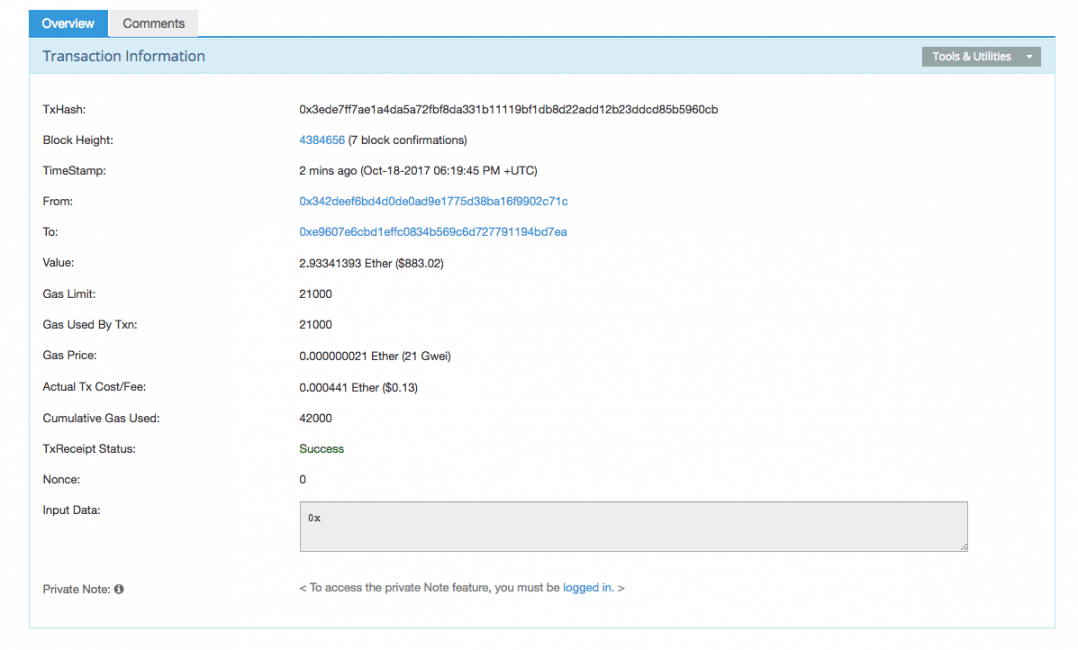
Let’s take a look at a random Ether transaction via EtherScan.
2. Breaking Down the Key Transaction Details
Here, we’ll examine the main fields displayed in an Ethereum transaction and explain what they mean:
TxHash – Also known as the transaction ID, TxHash is a way to look up a specific transaction on the Ethereum blockchain.
Block Height – The block number in which the transaction was included (for an in-depth explanation of blocks, watch this video)
Time Stamp – The time the transaction entered the blockchain (i.e., the time the block was mined)
From/To – The sending and receiving Ethereum addresses
Value – How much Ether was sent and the equivalent USD value
3. Understanding Gas: The Engine of Ethereum
Before we move to the rest of the terms, let’s look at a short explanation of “gas.”. Gas is similar to Bitcoin’s transaction fee, but instead of paying a flat fee, you pay for every unit of computational work your transaction requires.
Gas is measured in Gwei (a fraction of ETH), and its price fluctuates based on network demand. If you’ve ever wondered why your transaction was stuck for hours or why fees suddenly spiked, gas pricing is the reason.
You pay for gas using Ether (ETH), but you don’t actually own it. When you send a transaction on the Ethereum blockchain, the cost is simply calculated at a fixed gas-to-Ether exchange rate.
Gas Limit – The maximum amount of gas the sender is willing to buy for the transaction
Gas Used by Txn – The actual amount of gas used for the transaction
Gas Price – The price of gas in Ether. Gas’s price is decided by miners. (One GWei is 10^9 Wei or 10^-9 ether).
Actual Tx Cost/Fee – Gas used * gas cost
4. Other Advanced Transaction Details
Once you’ve covered the basics, you’ll encounter a few more technical fields:
Cumulative Gas Used – The total amount of gas used when the transaction was executed on the block. This doesn’t have any real meaning for us at this point.
Tx Receipt Status – Was the transaction successful?
Nonce – A sequential number tied to every transaction that represents the number of transactions the sender account has made on the network. So for example, the first transaction an account sends will have a nonce of 0, the second a nonce of 1, and so on.
5. Final Thoughts
That’s it! You now understand the essential parts of an Ethereum transaction. With this knowledge, you can verify your own transactions, audit smart contract interactions, and even identify trends across the Ethereum network. This is the first step into understanding what is happening on chain. You’re on your way to becoming the next ZachXBT.
As Ethereum continues evolving with scaling upgrades and Layer 2 networks, these basics will remain fundamental for anyone who wants to stay informed and in control of their crypto activity.

Why you can trust 99Bitcoins
Established in 2013, 99Bitcoin’s team members have been crypto experts since Bitcoin’s Early days.
Weekly Research
100k+Monthly readers
Expert contributors
2000+Crypto Projects Reviewed