

In This Article
Thinking about getting into Bitcoin mining? Excellent. One of the things you will need is software to run your mining hardware. Welcome to 99Bitcoins: In this guide, we’ll review the best Bitcoin mining software available on the market in 2026.
Key Takeaways
- Choosing the right mining software ensures compatibility with your hardware.
- Beginner-friendly software with a GUI is great to start, but advanced users may prefer command-line tools.
- Evaluate software based on key features like pool support and hash-power optimisation.
- Mining profitability depends not just on software but factors like electricity cost, hardware efficiency, mining difficulty, and real-time earnings tracking.
- Before you commit, ensure the software is actively maintained, originates from a reliable source, and receives timely updates for security and performance.
Bitcoin Mining Software: Summary
Whether you’re joining a mining pool or mining solo, you will need to get familiar with the most up-to-date mining software or best Bitcoin mining app. The various software options available differ in the types of miners they support (GPU/ASIC/FPGA), the platforms they support (Windows, Linux, etc.), and other features.
Whatever your choice is, remember to follow certain steps to successfully mine bitcoins:
- Get the right Bitcoin miner software (for mining Bitcoin, only ASIC miners will do).
- Get the best software that matches your needs.
- Decide whether you’re joining a pool or going solo.
- Start mining.
Here are the best programs for mining Bitcoin:







That’s what you need to know about the best crypto mining software in a nutshell. For a more detailed review of the software mentioned, keep on reading.
Bitcoin Mining Overview
If you are reading this, it means you are familiar with the fundamentals of Bitcoin mining and have the necessary hardware for mining. If not, before moving forward, I suggest you go back and read our guide on Bitcoin mining. And if you don’t like reading, here’s our video on the subject:
Mining software is an essential part of your mining operation. It provides you with an interface to monitor and manage your miner’s settings (clocking speed, fan speed, etc.).
More importantly, it allows you to put your miner to work and start making money by connecting to a pool, or to the Bitcoin network if you are mining solo (not recommended).
There are several things you need to look out for when choosing your cryptocurrency mining software:
- Hardware Compatibility: Ensure your software is compatible with your rig type (ASIC, GPU, or CPU).
- Ease of Use: GUI for beginners (e.g., EasyMiner) vs. command-line for experts (CGMiner).
- Platform Support: Windows, macOS, Linux, or browser-based (CryptoTab).
- Advanced Features: Support for pool switching, dashboards, alerts, and mobile integration.
- Profit Model: Software-only vs. marketplace models (like NiceHash).
How to Start Mining Instantly
If you’re not looking to mine Bitcoin specifically, you can use a program like HoneyMiner that mines the coin that is most profitable for you to mine based on your computer’s specifications.
While you may be mining some obscure coin, you’ll still be getting paid in Bitcoin, so this could be a good way to start mining instantly. However, if you want to become a professional miner, you’ll have to use dedicated mining equipment and more advanced software.
According to HoneyMiner’s site, you can make anywhere between $15-$75 a month, assuming you have at least one graphics card. Keep in mind, this does not include the electricity cost for running HoneyMiner.
Best Bitcoin Mining Software 2026
Coin Mining Farm
CoinMiningFarm offers an ecological cloud mining platform powered by over 90% green energy, including wind, hydroelectric, and geothermal sources. Users can rent state-of-the-art Bitcoin miners with secure and transparent operations.
Pros Cons

The platform stabilizes monthly profits through a liquidity pool, shielding users from Bitcoin’s market volatility. All contracts are designed to generate returns, with durations ranging from 20 days to 10 years.
CMF features robust security with AES 256-bit encryption and a PCI DSS 3.2-certified payment system for fast daily withdrawals. The support team is available 24/7 to assist users.
Investment plans are tailored to suit various budgets, from a Basic Plan (0.7% daily profits) to high-yield options like the X-MAS Plan (18% daily profits). With over 216,000 registered users and 2,861 operational days, CMF has built trust in the cloud mining space.
CryptoTab Browser
CryptoTab Browser lets you mine Bitcoin while browsing. Watch videos, chat, or surf the web and earn in the background.
Its built-in mining algorithms make earning BTC easy. Want faster results? Use the Cloud.Boost feature or link multiple devices to increase mining speed.
Pros Cons
Platforms: Windows, macOS, Android, iOS

CryptoTab supports Chrome extensions, enabling you to customize your browsing experience. Sync your data across desktop and mobile for seamless use.
With over 35 million users worldwide, CryptoTab is trusted for its security and speed, turning everyday browsing into a passive income opportunity.
Binance Cloud Mining
Binance Cloud Mining provides an easy entry point for crypto mining. Users can rent hashrate units (Th/s) and earn Bitcoin without needing physical mining equipment. Contracts range from short-term to long-term, catering to various investment preferences.
Pros Cons
The platform ensures transparency with real-time hashrate tracking and calculates rewards based on actual performance. Premium mining sites and a professional operations team deliver consistent uptime and efficiency.
However, returns may fluctuate due to Bitcoin price volatility and adjustments in mining difficulty. Pre-sale contracts often involve a waiting period before mining begins.
For those seeking a low-maintenance mining solution backed by Binance’s reputation, Cloud Mining is worth exploring. Visit Binance to learn more and start mining today.
Hashmart
Hashmart makes cloud mining simple. No hardware. No hassle. Just pick a contract and start mining Bitcoin or Ethereum instantly.
The platform boasts 150.5 Ph/s of hash power and 99.97% uptime. Real-time monitoring and daily payouts keep everything transparent. For withdrawals, there are no fees.
Pros Cons
Platforms: Web, Mobile
 Choose from 12-month contracts or open-ended plans. Fixed-term contracts include all fees, while open-ended ones charge a small daily maintenance fee.
For those who already own mining equipment, Hashmart lets them sell their computational power and earn more.
Hashing24
Hashing24 offers a simple and reliable cloud mining solution for Bitcoin. No hardware. No maintenance. Just pick a contract and start earning.
As Bitfury’s official partner, Hashing24 delivers top-tier mining infrastructure. With globally located data centers, users enjoy 100% uptime and consistent performance.
Pros Cons
Platforms: Web
Daily payouts ensure steady earnings. New to mining? Try Demo Mining risk-free to see how it works. Contracts are available in various hash power options, making it easy for beginners and pros alike.
Overall, Hashing24 skips the hassle of hardware and gets you mining Bitcoin in no time.
Kryptex
Kryptex is a user-friendly Windows application that calculates the most profitable coins to mine, maximizing performance and paying you in bitcoins or real-world currency. The app requires no mining experience or complicated setup and offers remote control for pausing or resuming operations from anywhere.
Pros
- Supports easy-to-use
- No experience needed
- cloud mining and mining pools
Cons
- Limited to Windows
Platforms: Windows

The application automatically updates to the most efficient miners and features a lite mode, allowing you to use your computer for regular activities without significant performance loss. It also includes a profitability calculator and supports withdrawals with a minimum amount of just $0.50, making it an accessible and flexible mining solution. Kryptex stands out as a practical solution for those looking to monetize their PC’s computing power without diving into the complexities of traditional mining setups.
Awesome Miner
Pros
- Supports GPU/ASIC mining
- Optimized Antminer firmware
- Remote cloud management features
Cons
- Full access to features for specific Antminer firmware editions only
Platforms: Windows, Linux

Awesome Miner tops our list with highly scalable mining management software designed for large-scale operations. It supports up to 200,000 ASIC miners and 25,000 GPU/CPU miners. The software also offers optimized Antminer firmware that significantly boosts performance for models such as S17, S19, and S21.
The software offers extensive flexibility with support for over 50 popular mining software options and hundreds of cryptocurrencies. Users can also add and deploy custom mining software, algorithms, cryptocurrencies, and mining pools. The software is compatible with both Windows and Linux, and its cloud services provide a web-based interface for remote management from any device. Notifications via the Telegram app ensure that users are always informed about their mining operations.
CGminer
Pros
- Supports GPU/FPGA/ASIC mining
- Popular (frequently updated)
Cons
- Textual interface
Platforms: Windows, Mac, Linux
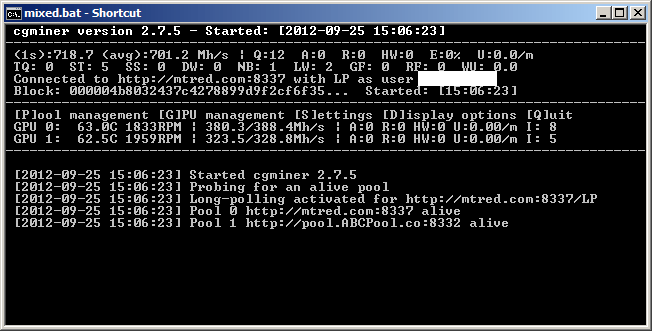
Going strong for many years, CGminer is still one of the most popular GPU/FPGA/ASIC mining software available. CGminer is a command-line application written in C. It’s also cross-platform, meaning you can use it with Windows, Linux, and Mac OS.
The software includes overclocking, monitoring, fan speed control, and remote interface capabilities, among others. With ASIC, FPGA & GPU and multi-pool support, CGminer is more than an adequate solution to handle your mining operation.
BFGminer
Pros
- Powerful miner with many features
- Cross-platform, including Raspberry Pi
Cons
- GPUs not supported
- Suitable for more advanced users
Platforms: Windows, Mac, Linux
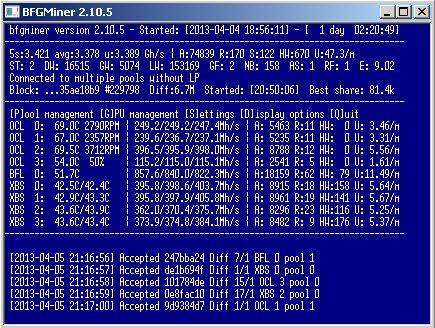
Unlike CGminer, BFGminer is designed specifically for FPGA and ASICs and doesn’t support GPU mining software. More oriented towards the tweaking audience, it features dynamic clocking, monitoring, and remote interface capabilities.
Besides being a super versatile program, BFGminer is also cross-platform, including an option to install on Raspberry Pi, which is pretty neat. Though text-based, the interface is very straightforward, and you can use hotkeys to go through the different options it offers.
Lastly, BFGminer has a watchdog thread to detect idle threads and restart them or stop failed reconnects to spare your resources. Among the ASICs supported by BFGminer, you can find Antminer U1/U2, Block Erupter USB, Red/Blue Fury, and more.
EasyMiner
Pros
- Graphic UI
- Moneymaker mode for quick start-up
Cons
- Windows installation triggers AV
Platforms: Windows, Ubuntu
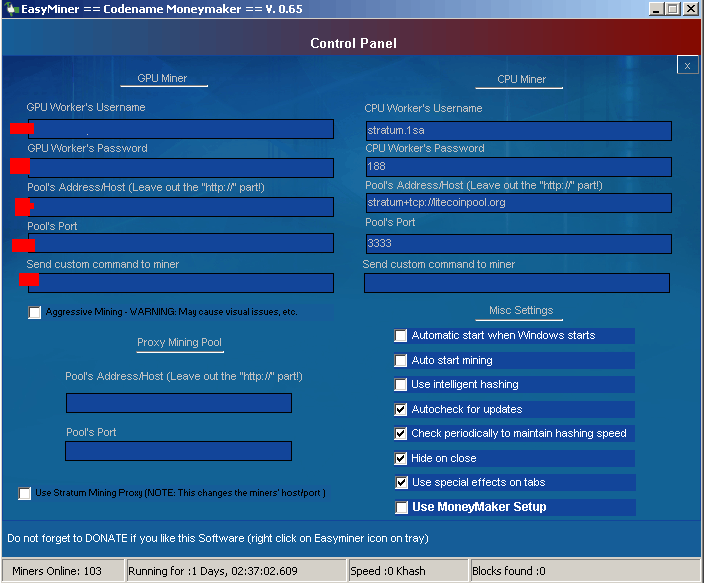
More of a GUI-based version of BFGminer and CGminer than a miner by itself, EasyMiner is a user-friendly solution for miners who don’t like to work on the popular Command Line Interface-based mining tools. With this tool, you can also get ga raphical visualisation of your statistics and performance, which is pretty neat.
Like other mining software, EasyMiner allows you to configure your miners to connect to external mining pools or mine solo. Additionally, the tool includes its own “MoneyMaker” mode, which allows you to instantly create a paper LTC wallet and connect to its own private pool.
From several testimonials, it appears that Windows antivirus software products tend to get jumpy during the installation process. Apparently, this is “thanks” to some hackers who used malicious versions of the miners as part of a botnet attack on affected users.
Also, while officially EasyMiner is only available for Windows, they offer an Ubuntu version of the software.
MultiMiner
Pros
- Beginner friendly
- Graphic UI
Cons
- Installing on anything other than Windows requires some work
Platforms: Windows, Mac, Linux
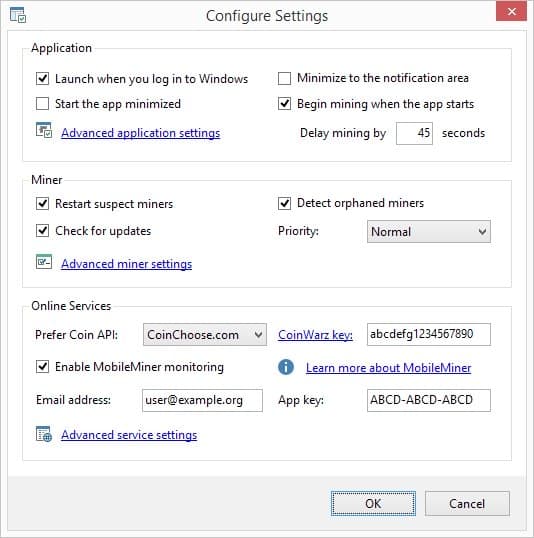
Known as one of the most beginner-friendly, best bitcoin mining software out there, BFGminer-based MultiMiner is a graphical, powerful yet simple solution for your Bitcoin mining needs.
Once the installation process is done, the tool detects your installed mining hardware and creates a table with all the required info.
The software allows you to choose which coins you wish to mine per the connected mining device (GPU, ASIC, FPGA). MultiMiner is also packed with additional features such as an option to choose your mining strategy, remote access to your rig, and tooltips to get you familiar with the complicated mining terms.
Though very appealing for newcomers, MultiMiner also allows more advanced options for power users, such as direct access to API settings and engine arguments.
MultiMiner is cross-platform. For detailed information on the latest releases and instructions on how to install on different OSs, check out this GitHub.
Bitcoin Mining Software Comparison
| Software | Best For | Key Features | Drawbacks / Considerations |
|---|---|---|---|
| CGMiner | Tech-savvy miners | Open-source, supports FPGA/ASIC, highly customizable, command-line interface | Steeper learning curve; not beginner-friendly |
| Awesome Miner | Experienced miners, multi-rig setups | Centralized dashboard, automation tools, supports 50+ mining engines | Best on Windows; advanced features require setup |
| CryptoTab Browser | Beginners / casual users | Mining built into browser, easy onboarding, passive mining while browsing | Very low earnings; limited serious mining use |
| EasyMiner | Novices exploring mining | Simple GUI, supports solo and pooled mining, beginner-friendly setup | Limited advanced features for scaling |
| Hive OS | Large-scale mining operators | Centralized management, remote monitoring, supports thousands of rigs | Monthly fees for larger operations; complex setup |
| NiceHash | Entrepreneurs & flexible miners | Marketplace for buying/selling hash power, supports multiple coins | Earnings tied to market demand; third-party risk |
Conclusion
Bitcoin mining software is more than just a utility, it’s the control center for your entire operation. Whether you’re experimenting on a laptop, running a few ASICs, or managing a warehouse full of rigs, the right program can make or break your profitability.
For beginners, ease of use is key, which is why tools like CryptoTab Browser and EasyMiner provide an accessible entry point without requiring deep technical knowledge. More advanced users may find CGMiner or Awesome Miner far better suited, as they provide granular control, custom configuration, and better optimization potential. At scale, centralized solutions like Hive OS become indispensable for keeping costs down and efficiency up. And for those who want to approach mining more like a business, NiceHash offers a marketplace that turns hash power itself into a tradable asset.
No matter which software you choose, success depends on more than features. Always ensure the program is actively maintained, compatible with your hardware, and comes from a trustworthy source. Mining profitability can swing wildly with energy costs and Bitcoin’s market price, but the software you select will determine whether you’re simply running machines, or running a sustainable mining operation.
See also:
- What is Bitcoin Mining and How Does it Actually Work in 2026
- Bitcoin Mining Hardware Reviews & Comparison
- Best Bitcoin Mining Pools in 2026
FAQs
What is the best miner for Bitcoin?


Currently, the best miner on the market for mining Bitcoin is the Antminer S19 Pro by Bitmain.
Is it worth to mine bitcoins?
Bitcoin mining has become more of a profession than a hobby these days. If you want to mine profitability, you’ll need to invest heavily in equipment, get cheap electricity, and locate yourself in a cool area since miners tend to heat up very fast.
It’s recommended to use a Bitcoin mining calculator to estimate your profitability before investing any capital in buying mining equipment.
Can you mine bitcoins on your phone?
While technically mining can be done on a mobile phone, in practice, it will not yield any results and probably just heat the phone’s CPU.
References:
- “What Are Ordinals? A Beginner’s Guide to Bitcoin NFTs.” Decrypt, https://decrypt.co/resources/what-are-ordinals-a-beginners-guide-to-bitcoin-nfts
- BitMEX Research. “Interesting Bitcoin Statistics.” X, 10 Jan. 2024, https://x.com/BitMEXResearch/status/1773674532500312534?s=20
- State University of New York at Oswego. “Basics about Cryptocurrency.” CTS – Campus Technology Services, www.oswego.edu/cts/basics-about-cryptocurrency

Why you can trust 99Bitcoins
Established in 2013, 99Bitcoin’s team members have been crypto experts since Bitcoin’s Early days.
Weekly Research
100k+Monthly readers
Expert contributors
2000+Crypto Projects Reviewed